
VPC integration with LKE Enterprise
When deployed, all LKE Enterprise clusters are assigned to a VPC. By default, this VPC is automatically generated and unique to the cluster. Optionally, some customers can deploy clusters to an existing VPC.
Considerations
- Some features, including LKE Enterprise dual-stack support and support for existing VPCs, are not available to all customers. Please reach out to your account manager to learn more about enabling these features.
- Some accounts only support using IPv4 VPCs with LKE Enterprise. If this is the case, you cannot deploy a new cluster to a VPC with IPv6 enabled.
LKE Enterprise VPC assignment
By default, a VPC is auto-generated for the cluster when the cluster is deployed. Some customers can now configure LKE Enterprise to use an existing VPC.
- Automatically generate a VPC: A new VPC is auto-allocated for the cluster. If no subnet is specified, one is auto-allocated with an IPv4 prefix size of
/13(in the IP space10.0.0.0/8) and, if your account is not limited to IPv4-only, an IPv6 prefix size of/52. - Use an existing VPC: Some customers can optionally deploy new LKE Enterprise clusters to existing VPCs. The VPC must be located in the same region as the cluster and support both IPv4 and IPv6 (dual-stack). An exception to this is if your account is specifically configured to use VPCs with LKE over IPv4-only. If you wish to deploy the LKE cluster on an existing subnet, the subnet's IPv4 range needs to have a prefix of
/13or/14and the subnet cannot already be used by another cluster. If you wish to use IPv6 as well, the subnet must also have an IPv6 range with a prefix of/52. If no subnet is specified, one is auto-allocated with an IPv4 prefix size of/13(in the IP space10.0.0.0/8) and, if your account is not limited to IPv4-only, an IPv6 prefix size of/52.
What happens to the existing VPC and subnet when deleting the cluster?If you add an LKE Enterprise cluster to an existing VPC, that VPC remains on your account when the cluster is deleted. If you specified a subnet, that subnet and its VPC both remain after the cluster is deleted. If no subnet was specified and it was automatically generated instead, the subnet will be removed from the VPC when the cluster is deleted.
Select a VPC when creating a new cluster
A cluster is assigned to a VPC during deployment. Once deployed, the VPC cannot be changed. Follow the instructions below to learn how to select a VPC in Cloud Manager and Linode API
Select a VPC in Cloud Manager
-
Follow the Create a cluster guide to start creating a new cluster with the following settings:
- Tier: LKE Enterprise
- Region: Select a region that supports all the required features, including LKE Enterprise, use existing VPCs with LKE, and optionally dual-stack. If you wish to use an existing VPC, you must also have a VPC deployed to this region with the proper configuration.
- Kubernetes Version: v1.31.9+lke5 or higher
- IP Stack: The IP stack can either be IPv4 or dual-stack (IPv4 and IPv6), depending on your own application's architecture and requirements.
-
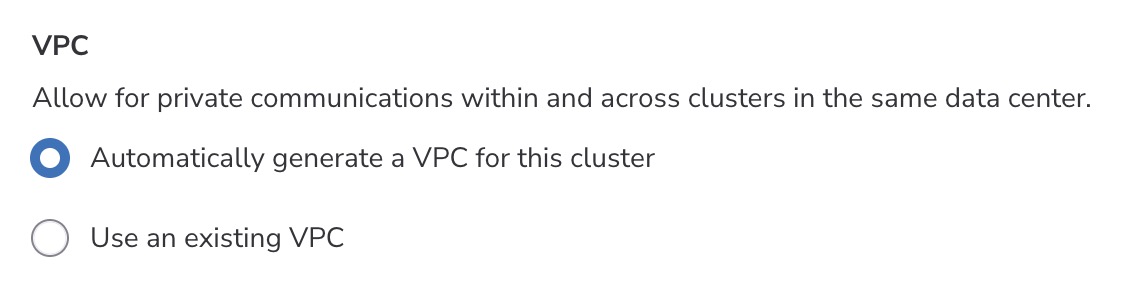
When you get to the VPC section, you can choose to automatically generate a VPC or to use an existing one. If you choose to automatically generate a new VPC when the cluster is completed, you skip the remaining steps in this section and move forward with creating your cluster.
-
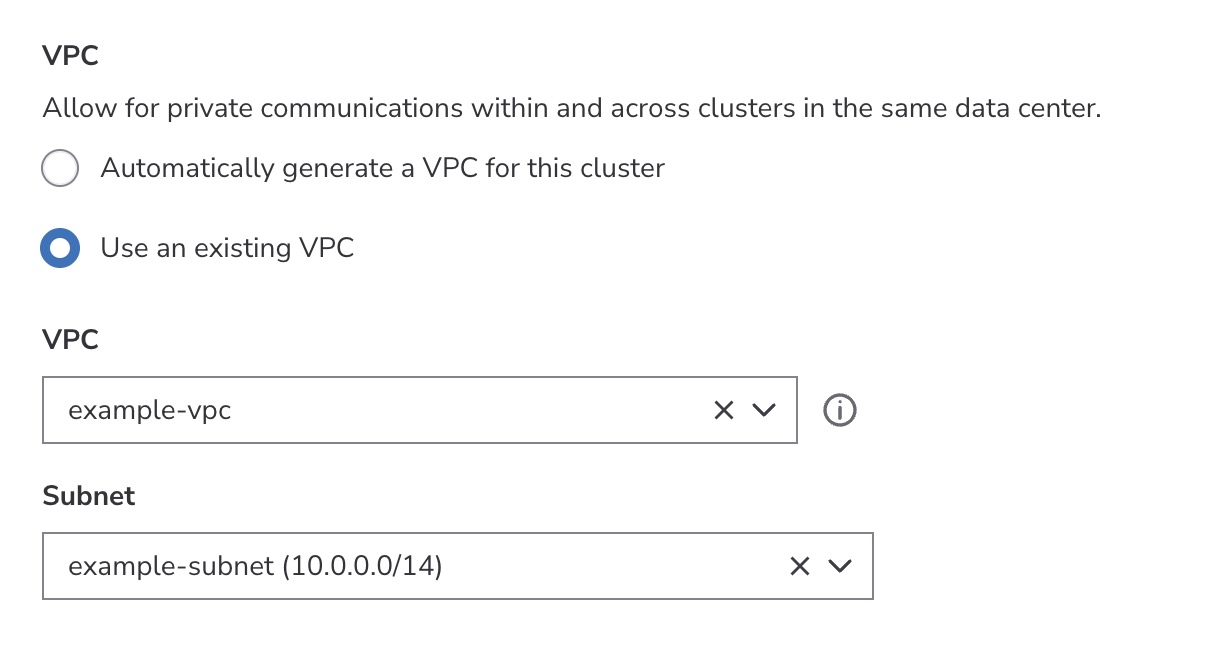
Select Use an existing VPC to move forward with choosing an existing VPC. This displays two dropdown menus, one for the VPC and one for the subnet.
-
The VPC dropdown menu is pre-populated with all VPCs currently deployed in the selected region. Select the VPC you wish to use with your new cluster.
-
Once a VPC is selected, the Subnet dropdown menu is populated with all subnets in that VPC. Optionally select an existing subnet or leave it blank to create a new subnet when the cluster is created.
-
Continue with any remaining steps on the Create a cluster guide.
Select a VPC in the Linode API
The following new fields have been added to the Linode API v4beta path, specifically the POST https://api.linode.com/v4beta/lke/clustersoperation.
vpc_id: The ID of the VPC to use for the Kubernetes cluster. For dual-stack clusters, the VPC must be IPv6 enabled. When both thevpc_idandsubnet_idfields are omitted, a new VPC is auto-allocated for the cluster.subnet_id: The ID of the subnet to use for the Kubernetes cluster. See LKE Enterprise VPC assignment for subnet requirements.
IPv4-only VPC
Follow these instructions for creating an LKE Enterprise cluster on an existing IPv4 VPC.
-
Create a VPC. To ensure the VPC is IPv4-only, do not specify the
ipv6field during creation. -
Create a subnet. Optionally create a subnet with a prefix length of
/13or/14. Skip this step if you wish to have a new subnet created when the cluster is added to the VPC. -
Create a new LKE Enterprise cluster and assign it to your existing VPC or subnet. Here is an example cURL command for creating a cluster on an IPv4 VPC (with no subnet specified). Replace the values as needed. If you wish to use an existing subnet, replace
vpc_idwithsubnet_idand enter the ID of that subnet.curl --request POST \ --url https://api.linode.com/v4beta/lke/clusters \ --header 'accept: application/json' \ --header "authorization: Bearer $TOKEN" \ --header 'content-type: application/json' \ --data '{ "label": "Enterprise cluster with existing IPv4 VPC", "k8s_version": "v1.31.9+lke5", "node_pools": [ { "count": 3, "k8s_version": "v1.31.9+lke5", "type": "g6-standard-1" } ], "region": "us-central", "tier": "enterprise", "vpc_id": 123456 }'
Dual-stack VPC
Follow these instructions for creating an LKE Enterprise cluster on an existing dual-stack VPC.
-
Create a VPC. Make sure to specify an IPv6 CIDR range of
/52or larger during creation. You can do this by using theipv6field in the API. -
Create a subnet. Optionally create a subnet with a prefix length of
/52. Skip this step if you wish to have a new subnet created when the cluster is added to the VPC. -
Create a new LKE Enterprise cluster and assign it to your existing VPC or subnet. Here is an example cURL command for creating a cluster on a specific subnet of an IPv6-enabled VPC. Replace the values as needed. If you wish to have a new subnet created, replace
subnet_idwithvpc_idand enter the ID of the VPC.curl --request POST \ --url https://api.linode.com/v4beta/lke/clusters \ --header 'accept: application/json' \ --header "authorization: Bearer $TOKEN" \ --header 'content-type: application/json' \ --data '{ "label": "Enterprise cluster with existing IPv6 VPC", "k8s_version": "v1.31.9+lke5", "node_pools": [ { "count": 3, "k8s_version": "v1.31.9+lke5", "type": "g6-standard-1" } ], "region": "no-osl-1", "tier": "enterprise", "subnet_id": 123456 }'
View VPC assignment and IP addresses
-
Navigate to the Kubernetes page in Cloud Manager and select the cluster you wish to review.
-
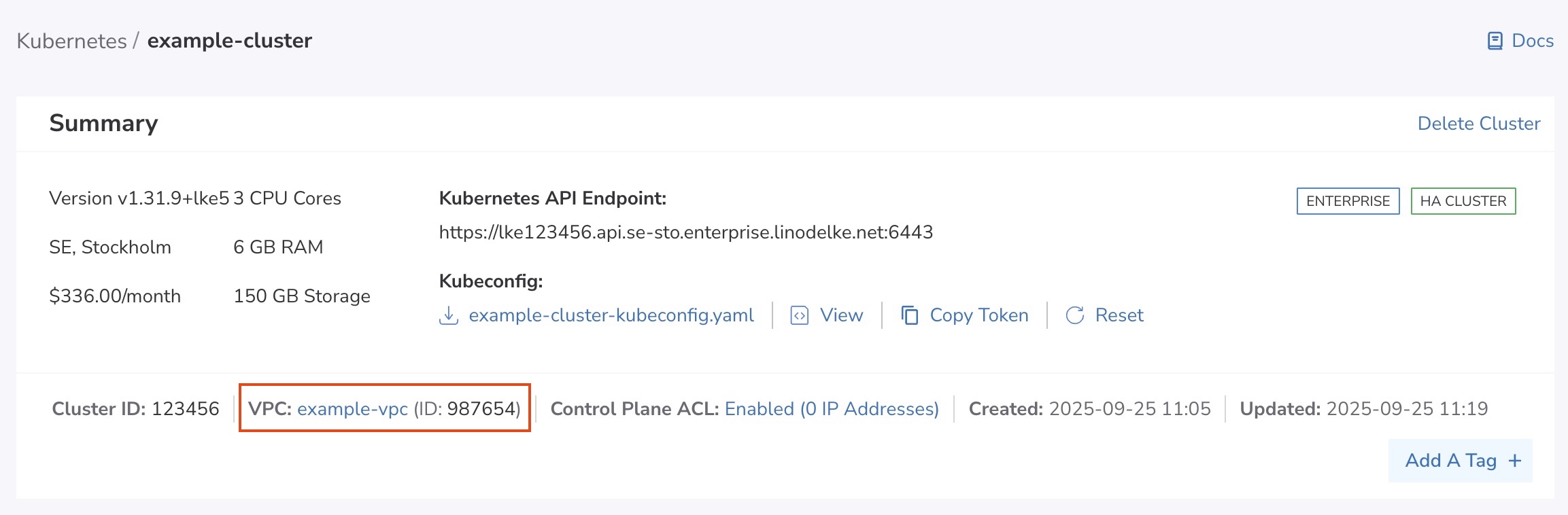
In the Summary area, the VPC is displayed. Clicking on the VPC opens the details page for that VPC where you can view or modify settings.
-
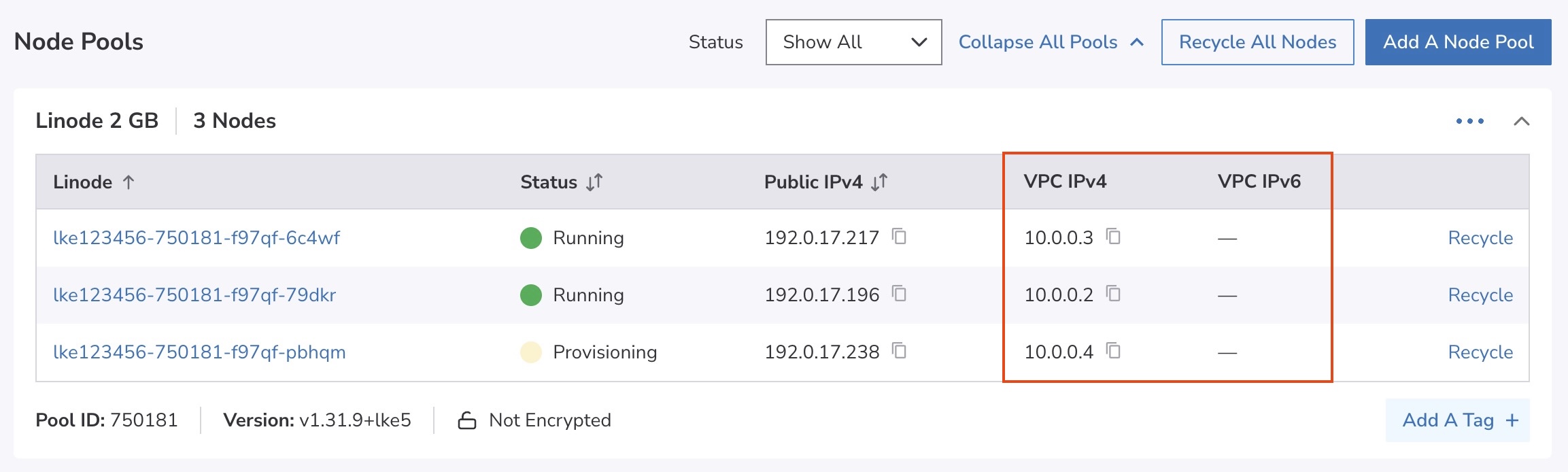
Within the Node Pools section, each worker node is listed along with its IPv4 and IPv6 assignment for the VPC.
Updated about 3 hours ago