
Use EAA logs with SIEM, API, or Unified Log Streamer (ULS)
Overview
This guide provides an overview of the different EAA data feeds generated by Enterprise Application Access (EAA) and how to consume them either using API, or with your SIEM. It also describes the contents from each log field and explain their meanings in a dictionary of data available in the logs.
The Enterprise Application Access application has a full suite of APIs. You need to build scripts to interact with the service. You can either write your own code to interact with the service or use pre-existing tools such as our Akamai Unified Log Streamer (ULS), or EAA package for Akamai CLI.
| EAA Log type | User Access Logs definition | Admin Audit Logs definition | Connector Health definition | Device Inventory definition |
|---|---|---|---|---|
| Akamai Log Streamer | ✓ | ✓ | ✓ | ✓ |
| CLI EAA | ✓ Command line example | ✓ Command line example | ✓ Command line example | ✓ Command line example |
| EAA API | ✓ | ✓ |
For using legacy EAA Splunk App for Splunk 7, see Splunkbase.
In case of any issues contact support.
Use Unified Log Streamer to integrate EAA and SIEM
You can integrate Enterprise Application Access (EAA) with any Security and Event Management (SIEM) using the Unified Log Streamer (ULS). The ULS is designed to simplify SIEM integrations for all Akamai Secure Enterprise Access Products:
-
Enterprise Application Access (EAA)
-
Enterprise Threat Protector (ETP)
-
Akamai Multi Factor Authenticator (MFA)
The modular design of ULS allows out-of-the-box integration with many SIEM solutions such as Splunk, Graylog, or Sumologic platform.
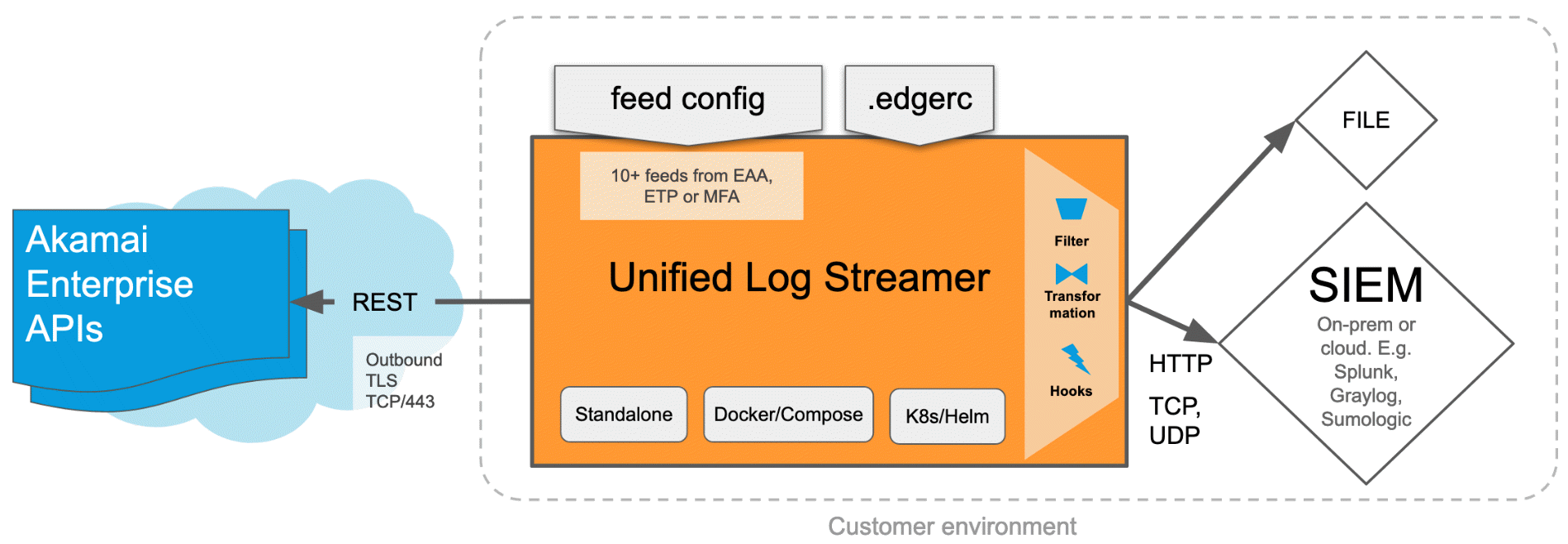
The ULS tool does REST API calls to Akamai Enterprise APIs and transports the data or security events which can be easily alerted by the customer's SIEM environment.
It is very flexible to deploy and operate the ULS. It can be run as a docker container or hosted standalone in your environment. It also supports the Helm deployment tool for Kubernetes, output Filter, Transformation, and Hooks, including the popular, flat "File" format. ULS can send data into any SIEM that supports either TCP, UDP or HTTP ingestion, both on-premises and cloud. Also, it is easy to get started since no coding or learning of the EAA APIs are required.
In Enterprise Application Access (EAA), we provide different data feeds like:
-
EAA access logs
-
EAA admin audit logs
-
EAA connector health
-
EAA Device Posture Inventory
You can choose any or all of these data feeds for your preferred SIEM solution.
You can find more information about the ULS open-source code on github at ULS repository.
You can find more information about documentation for any of the SIEM platforms at: SIEM repository.
To use the ULS tool in your SIEM environment:
-
You will need to setup EAA API credentials for ULS
-
Clone the binary from github ULS repository. Host it either as a Docker container or as a standalone binary on a host machine running Linux, macOS (Intel CPU).
Windows OS is not supported.
-
Configure any of the different feeds that you want to observe in your SIEM platform and obtain alerts for.
EAA Data feed adopted by SIEM solutions
Here you can find examples in RAW and in JSON formats and descriptions of the different log fields for EAA user access logs, EAA authentication logs, Admin audit logs, and Connector health logs.
Access logs
In the table below you can find fields of RAW log lines definitions from EAA user access logs, authentication details, limitations, examples, and extraction for Splunk environment.
There are two levels of separators used in these files: blank space and - (a hyphen). A hyphen replaces any space in a country name or date (for example in United-States). A space separates each field in the log line. For example, 2019-06-24T18:33:08<space>username.
NoteBlank rows like 2, 4, 6, 12, 14, and so on, indicate a space.
NoteFor Edge Transport based tunnel applications, you will see additional rows from 83 through 113 in the access logs.
| Type of content | JSON key | Field description | Example | |
|---|---|---|---|---|
| 1 | datetime | local_datetime | ISO 8601 date and time when the log was fetch, no specified timezone, local to the host fetching the data. | 2022-09-22T15:15:06.153000 |
| 2 | <space> | |||
| 3 | String or empty | username | Username Note: If this field is empty, it means that no user is authenticated yet. | username |
| 4 | <space> | |||
| 5 | String | apphost | Public-facing EAA endpoint hostname that is available in two versions:
| tunnel-app.frankfurt.example.net |
| 6 | <space> | |||
| 7 | String | http_method | HTTP method (also called a verb) | GET |
| 8 |
| - | ||
| 9 | String | url_path | URL path | / |
| 10 |
| - | ||
| 11 | String | http_ver | HTTP version | HTTP/1.1 |
| 12 | <space> | |||
| 13 | String | referer | URL Referrer | https://www.example.com/myapp |
| 14 | <space> | |||
| 15 | Integer 0-999 | status_code | HTTP Response code | 101 |
| 16 | <space> | |||
| 17 | Code | idpinfo | Event category + | +Note: The authentication status can be empty. See idp.evty and idp.st information in EAA authentication details table. | SENTRY|V |
| 18 | <space> | |||
| 19 | IPAddr | clientip | Client IP address | 213.109.181.6 |
| 20 | <space> | |||
| 21 | HTTP Verb | http_verb2 | HTTP method (explicit) Note: Same as field #7. | GET, POST |
| 22 | <space> | |||
| 23 | Float | total_resp_time | Total Response Time in seconds | 0.014 |
| 24 | <space> | |||
| 25 | Float | connector_resp_time | EAA Connector Response Time in seconds | 0.006 |
| 26 | <space> | |||
| 27 | Datetime | datetime | Datetime of the log line event | 2019-06-24T18:33:15+00:00 |
| 28 | <space> | |||
| 29 | Float | origin_resp_time | Origin Server Response Time in seconds | 0.006 |
| 30 | <space> | |||
| 31 | String | origin_host | Resolved IP in the datacenter | 172.31.200.65 |
| 32 | <space> | |||
| 33 | Integer | req_size | Request size in bytes | |
| 34 | <space> | |||
| 35 | String | content_type | Content-type | text/html |
| 36 | <space> | |||
| 37 | String | user_agent | User agent | Catchpoint |
| 38 | <space> | |||
| 39 | String | device_type | Device type | iPhone |
| 40 | <space> | |||
| 41 | String | device_os | Device operating system | iOS |
| 42 | <space> | |||
| 43 | String | geo_city | City name | Oakland |
| 44 | <space> | |||
| 45 | String | geo_state | State name (North America), province, region or other sub-division. Note: Hyphen means not available. | California |
| 46 | <space> | |||
| 47 | String[2] | geo_statecode | Two-letter state code (North America) Note: Hyphen means not available. | CA |
| 48 | <space> | |||
| 49 | String[2] | geo_countrycode | Two-letter country code in ISO 3166-2 format | GD |
| 50 | <space> | |||
| 51 | String | geo_country | Country name Note: Spaces in the country names are replaced by a hyphen (-). | United-States |
| 52 | <space> | |||
| 53 | String | internal_host | Internal hostname:port | clientapp.exampledemo.net:80 |
| 54 | <space> | |||
| 55 | String | session_info | Session information - idp.einfo . This field displays the following request/error messages:
| bearer-valid |
| 56 | <space> | |||
| 57 | String | groups | Group information | Domain+Users,IT+Department |
| 58 | <space> | |||
| 59 | String | session_id | User session ID | e3fb292d-9e7a-4f1f-cf77-0998ecf8427e |
| 60 | <space> | |||
| 61 | String | client_id | Client UUID - same ID reported in Device Posture reports, or in EAA Client UI > Diagnostic >Troubleshoot your Device | 5c98021e78e9c393b0714 |
| 62 | <space> | |||
| 63 | String | deny_reason | ACL deny reason | ClientIP |
| 64 | <space> | |||
| 65 | Integer | bytes_out | Bytes transferred from the connector to the user (via the EAA cloud). Available only for web applications.Value "-" is for Client-based application traffic. | 1234 |
| 66 | <space> | |||
| 67 | Integer | bytes_in | Bytes received from the user (via the EAA cloud) by the connector. Available only for web applications. Value "-" is for Client-based application traffic. | 1234 |
| 68 | <space> | |||
| 69 | String | con_ip | Connector IP. Note: This field is only present in classic apps and not client-based apps. | 192.168.100.123 |
| 70 | <space> | |||
| 71 | String | con_srcport | Connector source port. Note: This field is only present in classic apps and not client-based apps. | :3456 |
| 72 | <space> | |||
| 73 | String | conn_uuid | Connector UUID | 3bea6515-e122-4a56-8236-6536addd0e6c |
| 74 | <space> | |||
| 75 | String | cloud_zone | DPOP name | alpha-west-2-cloudproxy-4 |
| 76 | <space> | |||
| 77 | String | error_code | Code delivered in the error page. | 0 |
| 78 | <space> | |||
| 79 | String | client_process | Name of the software process consuming the Client-based app (TCP/UDP) | svchost.exe |
| 80 | <space> | |||
| 81 | String | client_version | Version of the EAA Client making the request | 2.8.1.22090201 |
| 82 | <space> | |||
| 83 | String | srvty | The type of service. Allowed values are: L - login proxy A - access log | A |
| 84 | <space> | |||
| 85 | String | idp.app | The name of the application | |
| 86 | <space> | |||
| 87 | String | eaaclient.txid | Transaction ID of the AZT Client or GPA Client | dad00531-d1cd-9a61-69b1-35ab6f3204fd |
| 88 | <space> | |||
| 89 | String | eaaclient.os | Operating system of the AZT Client or GPA Client | darwin-amd64 |
| 90 | <space> | |||
| 91 | String | eaaclient.proto | Type of protocol used for the connection by the AZT Client or GPA Client. Allowed values are TCP-terminated or UDP tunneled. | TCP-terminated |
| 92 | <space> | |||
| 93 | String | client_ghost_addr_geo.region_name | AZT Client’s or GPA Client’s Akamai edge network machine region | New-Jersey |
| 94 | <space> | |||
| 95 | String | connector_ghost_addr_geo.region_name | Connector’s Akamai edge network machine region | New-York |
| 96 | <space> | |||
| 97 | Float | crtt | Round trip time between AZT/GPA Client and Akamai stitcher node (usec) | 27000 |
| 98 | <space> | |||
| 99 | Float | drtt | Round trip time between the connector and Akamai stitcher node (usec) | 15000 |
| 100 | <space> | |||
| 101 | Float | ortt | Round trip time between the connector and origin (usec) | 45 |
| 102 | <space> | |||
| 103 | String | PE.decision | Policy engine decision. Most of the time it is ALLOW. | ALLOW |
| 104 | <space> | |||
| 105 | Float | PE.start_time | Policy engine transaction start time | 2025-11-17T19:23:23.354Z |
| 106 | <space> | |||
| 107 | Float | PE.duration | Policy engine duration to make decision (msec) | 93 |
| 108 | <space> | |||
| 109 | String | PE.geoip.region_name | Akamai Policy engine machine region | Virginia |
| 110 | <space> | |||
| 111 | String | stitcher.geoip.region_name | Akamai stitcher machine region | Virginia |
| 112 | <space> | |||
| 113 | String | log_type | Type of the log. pe-report indicates it is Edge Transport. | pe-report |
Important NoteFor error code, EAA gives the main error code, and in some scenarios, it also gives a sub error code. Please refer to Application response codes, login events, and errors for the sub-error codes.
Access Log examples for Edge Transport based applications
RAW format:
2025-11-17T14:23:38.916000 employee1 sample-app-akamai-com.go.akamai-access.com - - 100 SENTRY| 111.222.3.4 - - - 2025-11-17T19:23:38.916Z - 1.2.3.4:443 5374 - Chrome-142-0 Mac-OS-X-10-15 Mac Cambridge Massachusetts MA US United-States sample.akamai.com:443 - secGroupAUsers,secGroupBUsers f09fc169-38c1-42fb-c2d2-95cca224883b 1294a3c56c1fe1b39fb53a5252fc977a1b707a321f4920716fe0174e4551273e - 5374 12274 - e0c6e815-a56d-4c6f-a03f-309cd2946e92 - 0 Google-Chrome-Helper 7.2.2 A - dad00531-d1cd-9a61-69b1-35ab6f3204fd darwin-amd64 TCP-terminated New-Jersey New-York 27000 15000 45 ALLOW 2025-11-17T19:23:23.354Z 93 Virginia Virginia pe-report
JSON format:
{
"local_datetime": "2025-11-17T14:23:38.916000",
"username": "employee1",
"apphost": "sample-app-akamai-com.go.akamai-access.com",
"http_method": "",
"referer": "-",
"status_code": 100,
"idpinfo": "SENTRY|",
"clientip": "111.222.3.4",
"http_verb2": "-",
"total_resp_time": "-",
"connector_resp_time": "-",
"datetime": "2025-11-17T19:23:38.916Z",
"origin_resp_time": "-",
"origin_host": "1.2.3.4:443",
"req_size": 5374,
"content_type": "-",
"user_agent": "Chrome-142-0",
"device_type": "Mac-OS-X-10-15",
"device_os": "Mac",
"geo_city": "Cambridge",
"geo_state": "Massachusetts",
"geo_statecode": "MA",
"geo_countrycode": "US",
"geo_country": "United-States",
"internal_host": "sample.akamai.com:443",
"session_info": "-",
"groups": "secGroupAUsers,secGroupBUsers",
"session_id": "f09fc169-38c1-42fb-c2d2-95cca224883b",
"Client_id": "1294a3c56c1fe1b39fb53a5252fc977a1b707a321f4920716fe0174e4551273e", "deny_reason": "-",
"bytes_out": 5374,
"bytes_in": 12274,
"con_uuid": "e0c6e815-a56d-4c6f-a03f-309cd2946e92",
"cloud_zone": "-",
"error_code": 0,
"client_process": "Google-Chrome-Helper",
"client_version": "7.2.2",
"srvty": "A",
"idp.app": "-",
"eaaclient.txid": "dad00531-d1cd-9a61-69b1-35ab6f3204fd",
"eaaclient.os": "darwin-amd64",
"eaaclientinfo.proto": "TCP-terminated",
"client_ghost_addr_geo.region_name": "New-Jersey", "connector_ghost_addr_geo.region_name": "New-York",
"crtt": "27000",
"drtt": "15000",
"ortt": "45",
"PE.decision": "ALLOW",
"PE.start_time": "2025-11-17T19:23:23.354Z",
"PE.duration": "93",
"PE.geoip.region_name": "Virginia",
"stitcher.geoip.region_name": "Virginia",
  "log_type": "pe-report"
}
Access log examples
RAW format:
2022-09-22T15:28:31.450000 employee3 sjclientyahoo.stage.akamai-access.com GET-/-HTTP/1.1 - 101 SENTRY|V 147.92.90.233 GET 67.736 67.736 2022-09-22T22:28:31+00:00 67.736 66.218.87.15 6017 text/plain Chrome-105-0 Mac-OS-X-10-15 Mac Fremont California CA US United-States geo.yahoo.com:443 bearer-valid - 75cc22e0-fd34-4c85-cce2-8ef8ef6f2c66 ac7da8d27cbd38d3d9b765ba74d0054528c99091e509b44a40f3d2987f5b642d bearer-valid 6017 3000 10.22.2.232 e19afcd5-c12b-4198-8884-4b5b5b2ea2e2 DPOP-Alpha-East-U18 0 Google-Chrome-Helper 2.8.0.22060101
JSON format:
{
"local_datetime": "2022-09-22T15:28:31.450000",
"username": "employee3",
"apphost": "sjclientyahoo.stage.akamai-access.com",
"http_method": "GET", "url_path": "/",
"http_ver": "HTTP/1.1",
"referer": "-",
"status_code": 101,
"idpinfo": "SENTRY|V",
"clientip": "147.92.90.233",
"http_verb2": "GET",
"total_resp_time": 67.872,
"connector_resp_time": 67.872,
"datetime": "2022-09-22T22:28:31+00:00",
"origin_resp_time": 67.872,
"origin_host": "69.147.92.11",
"req_size": 1602,
"content_type": "text/plain",
"user_agent": "Chrome-105-0",
"device_type": "Mac-OS-X-10-15",
"device_os": "Mac",
"geo_city": "Fremont",
"geo_state": "California",
"geo_statecode": "CA",
"geo_countrycode": "US",
"geo_country": "United-States",
"internal_host": "beap-bc.yahoo.com:443",
"session_info": "bearer-valid",
"groups": "-",
"session_id": "75cc22e0-fd34-4c85-cce2-8ef8ef6f2c66",
"client_id": "ac7da8d27cbd38d3d9b765ba74d0054528c99091e509b44a40f3d2987f5b642d",
"deny_reason": "bearer-valid",
"bytes_out": 1602,
"bytes_in": 2780,
"con_uuid": "e19afcd5-c12b-4198-8884-4b5b5b2ea2e2",
"cloud_zone": "DPOP-Alpha-East-U18",
"error_code": 0,
"client_process": "Google-Chrome-Helper",
"client_version": "2.8.0.22060101"
}
EAA authentication details in user access logs
Authentication details can be found in the following log lines: access proxy, login server, and directory server. The latest logs are JSON formatted at the source and composed of key value pairs, where the value is a string or a dictionary of key value pairs.
The following table describes JSON keys relevant for the authentication event logs.
| Key | Purpose |
|---|---|
srvty | The srvty key distinguishes the type of service that generated the log line. The application proxy, login service and directory services are all implemented in a proxy service. |
idp.uid | The user identifier is determined by the authentication method.
|
idp.grps | The idp.grps key is a comma-separated and URL-encoded list of group memberships. Group names can have commas so URL encoding of group values is required. Other rules include:
|
idp.app | The idp.app event key application context for the request is:
|
idp.slogid | The idp.slogid key is a unique session log identifier that binds application sessions to the session identifier in the login server log lines. When present, this can be used to associate an application access event to a specific login event in the IP logs. |
idp.evty | You can determine the event category by looking at other properties in the log line such as srvty and URL.See below`idp.evty` key event categories table for details on event categories that appear in the log lines from the various edge services.
|
idp.st | The idp.st event key displays the authentication or API call status field.See below `idp.st` authentication status table for details on the authentication status results.
|
idp.cinfo | The idp.cinfo key provides customer visible text descriptions for some conditions. If this key is not set, its value defaults to a hyphen (-) or space. The following text messages appear when the idp.cinfo has been set:
|
idp.einfo | This is a free-form field primarily used for debugging issues. The text provides detailed descriptions of issues and may include errors raised by upstream services such as Kerberos/LDAP broker. |
| Event | Service | Purpose |
|---|---|---|
SENTRY | Application proxy | Indicates that the request was processed by the sentry module. Almost all requests received at the application proxy is processed by the sentry module, unless the request is rejected before the sentry module gets a chance to look at them. |
LOGIN | Login server | Indicates login-related activity on the login server. Login activity includes:
|
LOGOUT | Login server | The logout activity on the login server:
|
QUERY | Login server | A default event type for requests received over the back-channel interface between the application proxy and the login server. Some of the back-channel requests are relabeled under a different event category based on the nature of the request (see LOGOUT and LOGIN event types). Logs with these event types are for authentication protocol debugging use only. |
PORTAL | Login server | A default event type for API calls from the login server UI:
|
MFA | Login server | A default event type for 2-FA API calls from the login UI to the login server:
|
CONNECTOR | Directory server | All log lines generated from the directory server have this event type. The directory server relays the authentication API calls from the login server to the enterprise directory connector. |
| Authentication status | Service | Description |
|---|---|---|
V (Valid) | Application and login service | Indicates that session validation succeeded (cookie or bearer token validation):
|
I (Invalid) | Application and login service | Indicates that session validation failed. Either an expired cookie or token was presented to the service. |
- (Undefined) | Application, login, and directory service | A cookie or token was not validated for the request. This can happen if the processing of a request exits before cookie or token validation, or intentionally in the case of some API calls that do not require user validation, e.g., config layout API on the login server or for the directory service case which receives requests only from the login service. |
S (Success) | Login service | Indicates that the result of an authentication attempt was successful. MFA is not counted as an authentication attempt in the logs, so an S does not automatically imply that the logged-in user can access the application.A successful authentication results in a new session creation. A new session log identifier should be seen in the log lines. |
F (Failure) | Login service | Indicates that the result of an authentication attempt was a failure. Authentication can fail under multiple scenarios:
idp.einfo field to aid in troubleshooting. |
X (Expired) | Login service | A current session has been marked as expired. The session gets marked for expiry when there is an explicit logout from the user of an app that participates in a single logout. The session is retained in cache to complete the logout, but the creation of a new SSO session is disabled by marking it as expired. |
E (Error) | Login service | An error occurred during authentication protocol processing or there was a service failure. This was introduced along with SAML Identity Provider functionality. The goal is to identify cases where the peer entity in the authentication protocol is not behaving in accordance with the specification. You can move some of the authentication failure scenarios under this error code to simplify interpretation of the failure codes for customer logs. |
R (Rejected) | Login service | A user has a valid authentication session, however, request for access to a target application is rejected because the user does not have access to the app or the app is no longer available. |
D (Disabled) | Application | The authentication is disabled for the request. The user is set as anon-user. |
MC (MFA Challenge) | Login service | The MFA event API calls concerned with rendering of the MFA challenge page. This indicates that the user is prompted for an MFA challenge:
|
MR (MFA Register) | Login service | The MFA event API calls concerned with rendering of the MFA registration pages. This indicates the user is registering or modifying MFA settings. |
MF (MFA Failure) | Login service | The MFA validation failed. This results in denial of access to applications that require MFA, or denial of security-sensitive operations on the portal such as modifying the MFA settings itself or modifying users credentials. Multiple failed attempts also result in account lockout. For more information, see Set a temporary lockout for multiple failed login attempts. |
MD (MFA Done) | Login service | The MFA validation succeeded or is not required. MFA validation can succeed if the user presented a valid MFA token in response to the MFA challenge, or if the user's device was trusted (for example, the user clicked Remember Me). |
MI (MFA Invalid) | Login service | The MFA invalid is logged in case of a PCI DSS MFA scheme. The goal of PCI DSS MFA is to avoid disclosing user credentials or MFA failures to the user. To achieve this, the service declares user credentials as valid to the UI even when they are invalid. The response to the fake MFA challenge is ignored and instead of declaring it as MFA failure, it is declared as MFA invalid in the log lines. |
PCS (Password Change Success) | Login service | A user successfully changed the password using the change password API call. |
PCF (Password Change Failure) | Login service | A user failed to change the password. Password change can fail for many reasons such as poor password quality, violation of password history, etc. These reasons are displayed to the user on the UI and included as free form text in the idp.einfo field. |
User authentication examples
RAW format:
2021-07-23T09:40:05.575000 - login.akamaidemo.net GET-/oidc/oauth?client_id=3cd24...-HTTP/1.1 - 302 LOGIN|I 123.123.123.123 GET 0.002 - 2021-07-23T16:40:05+00:00 - - 827 text/html My-User-Agent Other Other Ashburn Virginia VA US United-States - sso-cookie-no-cookie-value - -
JSON format:
{
    "username": "-",
    "apphost": "login.akamaidemo.net",
    "http_method": "GET",
    "url_path": "/oidc/oauth?client_id=3cd24...",
    "http_ver": "HTTP/1.1",
    "referer": "-",
    "status_code": 302,
    "idpinfo": "LOGIN|I",
    "clientip": "123.123.123.123",
    "http_verb2": "GET",
    "total_resp_time": 0.002,
    "connector_resp_time": "-",
    "datetime": "2021-07-23T16:40:05+00:00",
    "origin_resp_time": "-",
    "origin_host": "-",
    "req_size": 827,
    "content_type": "text/html",
    "user_agent": "My-User-Agent",
    "device_os": "Other",
    "device_type": "Other",
    "geo_city": "Ashburn",
    "geo_state": "Virginia",
    "geo_statecode": "VA",
    "geo_countrycode": "US",
    "geo_country": "United-States",
    "internal_host": "-",
    "session_info": "sso-cookie-no-cookie-value",
    "groups": "-",
    "session_id": "-"
}
Limitations
There are some limitations related to the use of IP Application Accelerator. If you are using the IPA acceleration service, the Client IP and related geo information (lines 43-51 in the above table) represents the closest IPA gateway, not the actual user location.
Go to IP Application Accelerator to learn more about the acceleration service.
The data retention policy is 365 days.
Extract EAA Access Log fields
Set up RAW log field extraction with Splunk. EAA API delivers the access log event in a space separated text line (RAW format) and both CLI-EAA and ULS can deliver the same event also in a structured JSON format.
Most SIEM support extraction using regular expression. Please check your SIEM documentation for more details, or choose the JSON format instead. This is EAA extract regular expression for EAA log lines:
^([^\s]*)\s(?P<username>[\w\-]*)\s(?P<apphost>[\w\.\-]+)\s(?P<http_method>[A-Z]+)-(?P<url_path>.*)\-(?P<http_ver>HTTP/[0-9\.]*)\s(?P<referer>[^\s]*)\s(?P<status_code>[0-9]*)\s(?P<idpinfo>[^\s]*)\s(?P<clientip>[^\s]*)\s(?P<http_verb2>[^\s]*)\s(?P<total_resp_time>[^\s]*)\s(?P<connector_resp_time>[^\s]*)\s(?P<datetime>[^\s]*)\s(?P<origin_resp_time>[^\s]*)\s(?P<origin_host>[^\s]*)\s(?P<req_size>[^\s]*)\s(?P<content_type>[^\s]*)\s(?P<user_agent>[^\s]*)\s(?P<device_os>[^\s]*)\s(?P<device_type>[^\s]*)\s(?P<geo_city>[^\s]*)\s(?P<geo_state>[^\s]*)\s(?P<geo_statecode>[^\s]*)\s(?P<geo_countrycode>[^\s]*)\s(?P<geo_country>[^\s]*)\s(?P<internal_host>[^\s]*)\s(?P<session_info>[^\s]*)\s(?P<groups>[^\s]*)\s(?P<session_id>.*)[\s.*|]Prerequisite:
An account in Splunk. To download Splunk, go to Splunk page. For more details on downloading and installation, see Splunk installation manual.
-
In your Splunk account, select Settings > Fields > Field Extractions.
-
Click New to create a new field extraction.
The Add new window appears. -
In Extraction/Transform paste the extract.
-
Click Save.
After you save the changes, you can see how you can use the extracted regular expression in Splunk SIEM.
Admin logs
Fields definition and examples of Admin logs:
| Field | JSON key | Description |
|---|---|---|
| Date | datetime | Date and time of the event formatted in ISO 8601, including timezone suffix |
| Username | username | Email address of the admin user performing the action.If the action is trigger by a condition of the tenant the user is system |
| ResourceType | resource_type | Type of the resource being audited |
| Resource | resource | Name of the resource |
| Event | event | Name of the event |
| EventType | event_type | Type of the event |
RAW format:
% akamai eaa log admin --start $(( $(date +%s) - 30000 ))
#DatetimeUTC,AdminID,ResourceType,Resource,Event,EventType
2023-09-01T15:42:09+00:00,user1@akamai.com,users, user1@akamai.com,login,login
2023-09-01T09:17:29+00:00, user2@akamai.com,users, user2@akamai.com,login,login
2023-09-01T08:31:09+00:00, user3@akamai.com,users, user3@akamai.com,login,login
2023-09-01T07:43:03+00:00, user3@akamai.com,users, user3@akamai.com,login,login
# Start: 09/01/2023 07:39:14 UTC (EPOCH 1693553954)
# End: 09/01/2023 15:49:14 UTC (EPOCH 1693583354)
# Total: 4 event(s), 0 error(s), 395 bytes written
JSON format:
% akamai eaa --section akamaidemo log admin --start $(( $(date +%s) - 30000 )) --json
#DatetimeUTC,AdminID,ResourceType,Resource,Event,EventType
{
      "datetime": "2023-09-01T15:42:09+00:00",
      "username": user1@akamai.com,
      "resource_type": "users",
      "resource": user1@akamai.com,
      "event": "login",
      "event_type": "login"
}
Connector health
Fields definition and examples illustrating the health of the connector:
| Field | JSON key | Description |
|---|---|---|
| Connector ID | connector_uuid | ID of the connector |
| Connector Name | name | name of the connector |
| Reachable | reachable | 1 indicates connector is reachable, 0 otherwise see API definition |
| Status | status | Status of the connector |
| Version | version | Version of the connector software |
| Private IP | privateip | IP address attached to the connector in the datacenter. If the connector is publicly exposed (not recommended) the field contains a public IP |
| Public IP | publicip | Public IP of the connector seen by EAA platform (NAT public IP) |
| Debug mode | debugchan | Debug mode 1 for enabled, 0 for disabled. |
| Last update | ts | Last time connector sent the performance metrics |
| CPU% | cpu | CPU utilization in % |
| Disk% | disk | Disk utilization in % |
| Memory % | mem | Memory utilization in % |
| Network traffic | network | Network usage in Mbps |
| Total Dialout Count | dialout_total | Number of dialout the connector is handling |
| Idle Dialout Count | dialout_idle | Number of idle dialout |
| Active Dialout Count | dialout_active | Number of actively used dialout |
RAW format:
% akamai eaa connector list --perf
#Connector-id,name,reachable,status,version,privateip,publicip,debug,last_upd,CPU%,Mem%,Disk%,NetworkMbps,do_total,do_idle,do_active
con://cht3_GEjQWyMW9LEk7KQfg,demo-v2-con-1-amer,1,1,21.01.0-152,10.1.4.206,123.123.123.123,Y,2021-07-23T18:06:35.676Z,1.3,32.4,34.4,0.06,1304,1302,1
JSON format:
% akamai eaa connector list --perf --json | jq
{
    "connector_uuid": "cht3_GEjQWyMW9LEk7KQfg",
    "name": "demo-v2-con-1-amer",
    "reachable": 1,
    "status": 1,
    "version": "21.01.0-152",
    "privateip": "10.1.4.206",
    "publicip": "123.123.123.123",
    "debugchan": "Y",
    "ts": "2021-07-23T18:06:35.676Z",
    "cpu": 1.3,
    "disk": 34.4,
    "mem": 32.4,
    "network": 0.06,
    "dialout_total": 1304,
    "dialout_idle": 1302,
    "dialout_active": 1
}
SIEM support with Unified Log Streamer
It's common for organizations with mature security environment to have a Security Operations Center (SOC) that leverages security information and event management (SIEM) tools. SIEM provides a centralized view for security teams to access and analyze security information from a large number of sources, and prioritize mitigation efforts based on risk profiles.
EAA Unified Log Streamer allows you to stream EAA data feeds into your SIEM, no need to learn the API, it immediately gets you started.
Key features:
-
Continuous streaming to SIEM using TCP, UDP, HTTP, or flat File
-
Highly customizable
-
Choose between different EAA feeds
-
Filter any data you want to discard before sending it to SIEM
-
-
Operate as standalone script, service, Docker Container Image, or Kubernetes/Helm
-
No extra charge
The ULS GitHub project contains the detailed instructions to setup and operate ULS with your SIEM.
Updated 7 months ago