
How content delivery works
When someone visits your site, their browser performs a DNS lookup for your domain name. Without Akamai CDN, your DNS configuration returns an A or AAAA record that points to your origin server.
To route traffic through Akamai, you need to direct end users to an Akamai edge server. To do this, update your DNS with a CNAME record that redirects requests to the Akamai edge hostname assigned to your service hostname(s).
Once you have a CNAME redirect in place, Akamai DNS servers can return the IP address of the best edge server to fill the user's request. The browser then knows to use the Akamai IP addresses to retrieve content from your site. Edge servers regularly look up and connect to your origin server to retrieve and cache content as needed.
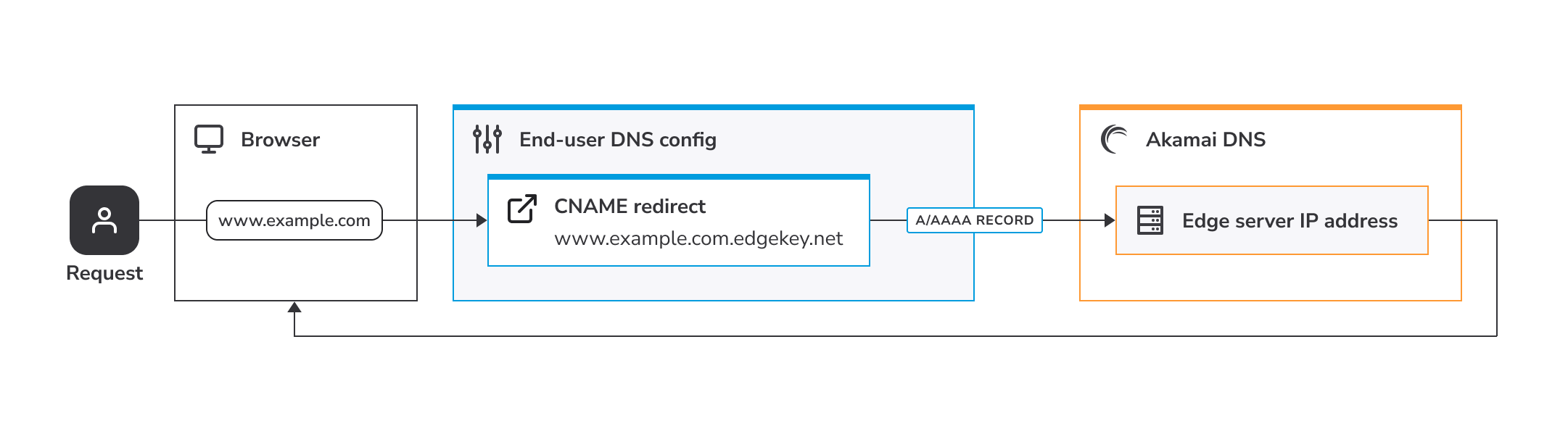
The request flow
Understand the flow of a request and how Akamai's content delivery network (CDN) fits in.
The stages of a request
When a request goes through the Akamai platform, it involves two connections:
- Client to Akamai edge server. This is the initial connection between the end user's browser or app and an edge server in the Akamai network. When you set up your delivery configuration, you assign an edge hostname to a service hostname (the domain your end users see). The edge server uses this mapping to read your configuration and decide how to deliver your content. To keep the connection secure, you'll need an edge certificate that's verified between the client and the edge server.
- Akamai edge server to origin. This is the connection between the edge server and the origin server where your content is hosted. You configure this using the required Origin Server behavior. Depending on your origin type, you might need to create and install a separate secure certificate at your origin. For more details, see Prepare your origin server.
Secure connections and certificates
Secure hypertext transfer protocol (HTTPS) is now the standard for accessing content on the Internet. All processes covered here focus on the use of this security to deliver your content through the Akamai network. While non-secure HTTP is still available, we don’t recommend using it.
HTTPS provides security on the web. When users visit your site or application over HTTPS, they expect their requests and provided responses to be encrypted and trustworthy, from end to end.
HTTPS, also known as Secure Sockets Layer (SSL) or Transport Layer Security (TLS), works by comparing a pair of encryption keys–one public and one private–to allow secure access. When a client connects over HTTPS, the server sends a certificate that includes:
- The public key.
- A list of sites on which the cert is valid, called the subject alternative name (SAN) list.
- The certificate’s expiration date.
- A signature from a Certificate Authority, proving the key is valid for a SAN listed in the certificate.
The client then checks that:
- The signature matches the certificate.
- The certificate comes from a trusted Certificate Authority.
- The certificate is actually for the site it requested.
- The certificate hasn't expired.
If all these checks pass, the client uses the public key to encrypt the information and sends it to the server, establishing a shared key for the session. Only a server with the matching private key can decrypt the information, read the shared key, and prove its identity to the requesting client.
Updated 6 months ago