
Variables
Overview
Variables are named containers for values that live outside your configuration. By replacing hardcoded parameters with variables, you decouple code from environments. This creates a "build once, deploy anywhere" workflow where the same rule set can move from development to production without any changes.
How it works
You define variables at the workspace level to act as global templates, assigning them a name, type, and optional default value. In your rule sets, you replace static data with a variable reference, such as {{origin_hostname}} or {{cp_code}}. This allows you to update a value in one central place and sync across all environments that use it.
When a specific lifecycle stage requires unique behavior, you can override these workspace defaults at the environment level. During deployment, the runtime automatically injects the correct value based on the target environment, allowing the same codebase to adapt dynamically across development, testing, and production variants.
Variable types
Variables fall into two categories: system variables, which are managed by the platform, and user-defined variables, which you create to fit your application's needs. Depending on the level of protection needed, you can set them to different visibility levels to ensure sensitive data like API keys remain secure.
System variables
System variables are predefined, read-only values provided by Akamai. You typically use them to access request metadata or platform-specific extensions. System variables use a builtin. namespace prefix in expressions, for example, {{builtin.AK_EXTENSION}}). For security, these are always Hidden, meaning their values are excluded from debug headers.
Available built-in variables
| Variable Name | Description |
|---|---|
| AKA_PM_CACHEABLE_OBJECT | True if the object is cacheable; false if it isn't cacheable. |
| AK_BASE_URL | The incoming request URL, from the first to the last slash inclusive, excluding the scheme and host. |
| AK_CLIENT_IP | The client IP address seen by the edge server. Can be overridden by X-Forwarded-For or Akamai-Client-IP headers. |
| AK_CLIENT_REAL_IP | The client IP address seen by the edge server. Request headers are ignored. |
| AK_CLIENT_RTT | The time elapsed (ms) for the TCP round-trip between the client and the edge server. |
| AK_CLIENT_TRANSFER_TIME | The time elapsed (ms) to transfer content from the edge to the client. Only available after client response completes. |
| AK_CLIENT_TURNAROUND_TIME | The time (ms) between receiving request headers and writing the first byte of the reply. Includes fetch or validation time. |
| AK_CONNECTED_CLIENT_IP | The IP on the TCP socket, whether it is a redirecting ghost or a client. |
| AK_CPCODE | The CP code associated with the request. |
| AK_CURRENT_TIME | The epoch time when edge metadata is applied to the request. |
| AK_DOMAIN | Hostname minus the first subdomain and dot (e.g., www.example.com becomes example.com). |
| AK_EDGEWORKERS_FAILURE | Populated when an EdgeWorkers error occurs. |
| AK_EDGEWORKERS_RP_STATUS | The execution status of the EdgeWorkers event using the responseProvider event handler. |
| AK_EDGEWORKERS_STATUS | The execution status of EdgeWorkers using onOrigin or onClient event handlers. |
| AK_EXTENSION | The filename extension of the incoming request. |
| AK_FILENAME | The filename of the incoming request. |
| AK_FIREWALL_ALERTED_RULES | A colon-separated list of IDs for firewall rules that triggered an alert. |
| AK_FIREWALL_DENY_RULEID | The ID for a firewall rule set to deny the request when the rule triggers. |
| AK_FIREWALL_DETECTED_RULES | A colon-separated list of IDs for all firewall rules that apply to the request. |
| AK_FIREWALL_MITIGATED_RULES | A colon-separated list of IDs for firewall rules that were mitigated. |
| AK_FIREWALL_TRIGGERED_RULES | A colon-separated list of IDs for firewall rules that were triggered. |
| AK_GHOST_IP | The IP address on which end client requests are received and resolve for the end user. |
| AK_GHOST_SERVICE_IP | The edge server IP address used to forward a request (the machine IP seen by the origin). |
| AK_HOST | Hostname of the incoming request. |
| AK_HOST_CNAME_CHAIN | A space-delimited list of the CNAME chain provided by DNS lookup on the Host header. |
| AK_MAPRULE | The maprule for the incoming request, such as a123.g.akamai.net. |
| AK_METHOD | The request method: GET, PUT, POST, HEAD, etc. |
| AK_ORIGINAL_URL | The raw incoming URL as received, including any repeated forward slashes. |
| AK_ORIGIN_DNS_NAME | The hostname that the Akamai server resolved to go forward to the origin. |
| AK_PATH | Path of the URL including filename and extension, but without query strings. |
| AK_PROTOCOL_NEGOTIATION | The protocol negotiated with the client (e.g., http2, http3, http/1.1). |
| AK_QUERY | The URL's query string. |
| AK_REFERENCE_ID | The global identifier for the request across the entire Akamai platform. |
| AK_REQUEST_ID | Unique identifier for each request on the specific edge server. |
| AK_SCHEME | Request scheme, either http or https. |
| AK_SLOT | Slot number on which the incoming request was made. |
| AK_TLS_CIPHER_NAME | The name of the cipher used for the SSL connection (or UNKNOWN for HTTP). |
| AK_TLS_ENCRYPTION_BITS | Bits of encryption used for the request. |
| AK_TLS_PREFERRED_CIPHERS | The value of the preferred-ciphers security tag for the request. |
| AK_TLS_SNI_NAME | The SNI (Server Name Indication) name submitted by the client. |
| AK_TLS_VERSION | The TLS version used for the connection. |
| AK_URL | The incoming request URL, including query string, but excluding scheme and host. |
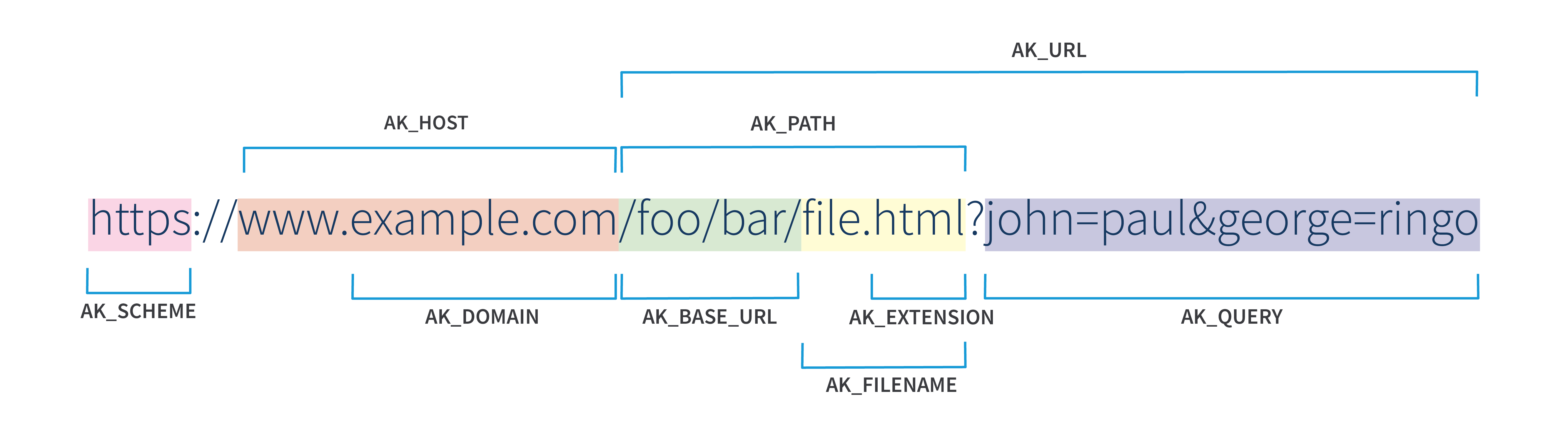
Example of the URL-related variables
User-defined variables
You can define your own variables at the workspace and environment levels to store the data your configurations rely on.
Variable formats
To ensure your data is processed correctly, variables support several formats:
- Primitive data: use strings for text (for example, a hostname), integers and floats for numerical values (for example, a TTL of 300 or a ratio of 3.14), and booleans for true/false toggles.
- Complex data: Use JSON or arrays to manage structured data or lists of values within a single variable.
Security and visibility
When creating a variable, you determine whether to expose, protect, or hide it from end-users and debugging tools. These settings protect sensitive information from accidental exposure.
You can assign three security levels:
- Visible: Variables are returned to the client in the
X-Akamai-Session-Info header, but only if the request includes thePragma: akamai-x-get-extracted-valuesheader. - Hidden: Hidden variables are not returned in the
X-Akamai-Session-Infoheader even if the debug header is used. - Sensitive: Reserved for high-security data, such as personally identifiable information (PII). Sensitive variables can't be sent to end-users through
Set-Cookieor response header behaviors, and they're not included in custom logging fields. They propagate their "Sensitive" attribute to any new variable derived from them.
Updated 4 months ago