
How Delivery Manager works
Delivery Manager is made up of modular components, each broken down into small, manageable parts. This structure gives you flexibility when creating and deploying your deliver configuration. These components work together to give you a centralized and controlled content management experience.
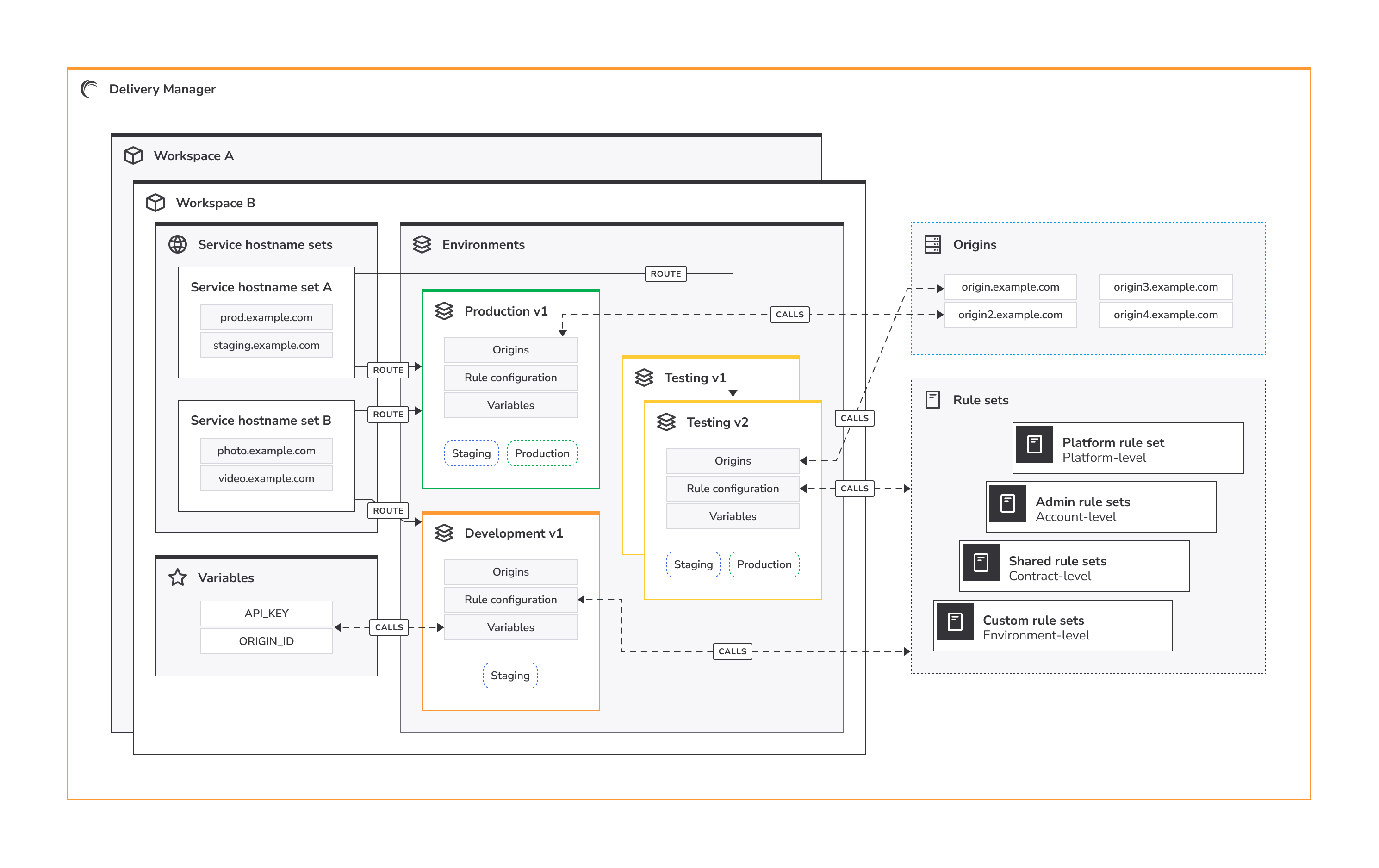
- Workspaces. Think of workspaces as containers for the components that deliver your applications or services. They allow you to isolate your configurations for different projects or teams, ensuring that changes in one project don’t affect others.
- Environments. Within each workspace, you can create *multiple versioned environments to represent different stages of your content delivery pipeline. Environments use environment profiles as templates for different lifecycles: development, testing, and production. Since each environment is an isolated deployment, you can safely test changes before making them live to your users. Customize your development strategy by routing service hostname sets to your different environments, and configure environment versions by calling origins, rule sets, and variables defined at the workspace-level. Depending on your environment profile, activate your environment version to either Akamai’s staging or production networks.
- Service hostname sets. These are containers for the service hostnames that define the web addresses (domains and subdomains, like
www.example.comorshop.example.com) that Delivery Manager manages for your project. Every workspace can have multiple service hostname sets where you simultaneously manage settings and routing for one or more service hostnames. You route service hostname sets to one or *more specific environments so your environment configurations can serve content to end users and apply business logic to requests based on how you set up your rules. Service hostname sets need to be activated to the same network as the environment it's routed to so they can work together. - Routes. You use routes to connect service hostname sets to one or *more environments in a workspace. Since service hostname sets can be activated separately from environments, you have the flexibility to safely update routes without affecting environment configurations, and vice versa.
- Variables. You define variables at the workspace-level so they can be called by any environment within that workspace. This means you can update parameters across multiple environments at the same time, and you don’t have to manually change settings every time you deploy a new environment version.
- Origins. Origins are the source of your content – the servers that actually have your website files, images, or videos. Origin content can come from Akamai infrastructure like NetStorage, Object Storage, or Linode instances, or from a third-party source like Amazon Web Services. You define and verify origins in Delivery Manager so that Akamai’s edge servers can deliver your content closer to end users with Akamai CDN.
- Rule sets. Rule sets containing one or more rules are defined at different levels within Delivery Manager–platform, account, contract, or environment–and can be used to build out your environment rule configurations. Rules are instructions that tell Delivery Manager how and when to handle end-user requests. Rules use matches and behaviors to control things like caching behavior, security settings, and dynamic content optimization.
Updated 4 months ago
Did this page help you?