
MSL5 Migration Guide - Final Phase
This guide outlines the mandatory prerequisites for fully migrating your live streams from MSL4 to MSL5 (Final Phase). Please verify all conditions and finalize the migration before MSL4 reaches End of Life (EOL).
- Target audience. Whether you've previously implemented a soft migration or a hard migration, this guide supports your journey to complete the migration to MSL5 Phase 3.
- Requirements. The final migration requires that all dependent systems—the encoder configuration, network firewall, and CDN configuration—are reconfigured to work with MSL5 before the cutover.
- Important Note. Failure to address any of these prerequisites will result in ingest failure, playback degradation, or CDN pull errors after migration.
The following sections describe the final-phase migration validation sequence, detailed steps, and the production migration procedure.
After the final phase migration, the content in MSL4 will no longer be available. Contact Akamai support if you need to retain the content.
Final Phase Migration Validation Sequence
Perform validation in the order as shown in the table below to catch issues before the production cutover.
| Category | Action Items |
|---|---|
| Network | Confirm firewall egress rule for *.mslentrypoint.net is active (TCP 443, TCP 80). |
| Network | Test TCP connectivity from encoder host to MSL5 entrypoint (ports 443 / 80). |
| CDN | Confirm AMD property has BOTH primary and backup origin hosts defined. |
| CDN | Confirm path-based origin selection rule routes /{streamid}-b/ paths to backup origin. |
| CDN | Confirm G2O keys are updated for both origin definitions. |
| CDN | Stage/test the AMD property in staging before activating on production. |
| Encoder | Update backup encoder ingest URL to MSL5 backup entrypoint. |
| Encoder | Update primary encoder ingest URL to MSL5 primary entrypoint. |
| Encoder | Start a test stream and verify segments are fetchable from CDN playback URL. |
| Playback | Confirm primary path (/{streamid}/) and backup path (/{streamid}-b/) both play back. |
1. Network Firewall — Egress Allow Rule for MSL5 Domain
Customer encoders commonly sit behind a corporate or datacenter firewall with restrictive egress rules that only allow outbound connections to explicitly approved domains. Because MSL4 and MSL5 use different domains, the existing MSL4 allow rule does not cover MSL5 ingest.
| Domain | Ports | |
|---|---|---|
| MSL4 | *\_.akamaientrypoint.net | TCP 80 (HTTP), TCP 443 (HTTPS push) |
| MSL5 | *\_.mslentrypoint.net | TCP 80 (HTTP), TCP 443 (HTTPS push) |
Action Required
Before migration, the customer's network/firewall team must add an egress allow rule for:
Destination domain: *.mslentrypoint.net
Ports:              TCP 443 (HTTPS push) and TCP 80 (HTTP push, if required)
Direction:          Outbound (encoder → MSL5 entrypoint)
This firewall change must be made and verified before the encoder is pointed at the MSL5 entrypoint. If the firewall is not updated first, the encoder will fail to connect after cutover and the stream will be interrupted.
Verification
After the firewall rule is in place, verify connectivity from the encoder host before the production cutover.
# Test HTTPS connectivity to MSL5 entrypoint (replace with actual entrypoint hostname)
curl -sv --max-time 5 https://p-ep50002.i.mslentrypoint.net/ 2>&1 | grep -E 'Connected|SSL|HTTP'

# If using port 80
curl -sv --max-time 5 http://p-ep50002.i.mslentrypoint.net/ 2>&1 | grep 'Connected'
A TCP connection (even a non-200 HTTP response) confirms the firewall is open. A Connection refused or timeout indicates the egress rule is still missing.
2. CDN Configuration — Akamai AMD Property for Redundant MSL5 Origins
MSL5 outputs content via an origin infrastructure that exposes separate origin hostnames for primary and backup regions. Unlike MSL4, which allowed customers to operate with a single primary origin hostname, MSL5 requires the CDN to be configured with both a primary and a backup origin to achieve the equivalent high availability. Customers who only configured a primary origin in MSL4 must add the backup origin definition in MSL5.
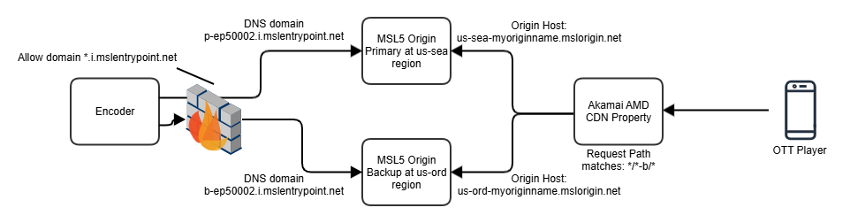
Refer to Configure AMD Property for Redundant MSL5 Origins for more information.
Stream Path Convention
MSL5 stream IDs are numeric and typically 5–8 digits in length. The backup ingest path appends -b directly to the numeric stream ID.
| Stream Path | Ingest source | Expected origin |
|---|---|---|
/{streamid}/... For example, /50002/... | Primary encoder → Primary MSL5 entrypoint | Primary MSL5 Origin Host |
/{streamid}-b/...For example, /50002-b/... | Backup encoder → Backup MSL5 entrypoint | Backup MSL5 Origin Host |
The -b suffix on the numeric stream ID identifies backup-ingested content. The Akamai AMD property must be configured so that requests for /{streamid}-b/ paths are forwarded to the backup origin host, not the primary.
Primary and Backup Origin Hosts
MSL5 origin hostnames follow the format {region}-{originName}.mslorigin.net. The region and origin name are assigned during MSL5 provisioning.
| Example Hostname | |
|---|---|
| Primary Origin Host | us-sea-myorigin.mslorigin.net |
| Backup Origin Host | us-ord-myorigin.mslorigin.net |
The origin name component, such as myorigin is customer-specific and provided in the MSL5 provisioning output. Primary and backup origins are typically in different geographic regions for resilience.
In the Akamai AMD property, configure two origin definitions — one for primary and one for backup — and use a match rule on the request path to select the correct origin:
- Requests with URL path matching
/{streamid}-b/. For example,/50002-b/)→ route to Backup Origin Host - All other requests → route to Primary Origin Host
MSL4 customers with single-origin configuration. If your MSL4 AMD property was configured with only a primary origin (no backup origin definition), you must add the backup origin definition for MSL5. Operating MSL5 with only a primary origin eliminates the redundancy provided by the backup ingest entry point.
AMD Origin Type Configuration
In MSL4, the AMD property selects the MSL4 origin automatically within the same Akamai account — no explicit origin hostname entry is required. In MSL5, the origin is no longer an in-account Akamai-managed resource. The AMD property must be reconfigured to use the "Your Origin" origin type, and the MSL5 origin hostname must be entered explicitly.
Update the following in the AMD property for each origin definition (primary and backup).
| Field | MSL4 | MSL5 |
|---|---|---|
| Origin Type | MSL4 Origin (in-account, auto-selected) | Your Origin |
| Origin Hostname | Populated automatically by AMD | Enter MSL5 origin hostname explicitly. For example, us-sea-myorigin.mslorigin.net |
| Origin Protocol | HTTPS | HTTPS |
| Origin SSL Certificate | Managed by Akamai | Verify TLS chain for the MSL5 origin hostname is valid and trusted |
G2O (Ghost to Origin) Authentication
MSL5 origins require G2O authentication to ensure only authorized Akamai edge/mid-tier servers can pull content from the origin. G2O is a shared-secret HMAC-based authentication mechanism. Refer to MSL4 Origin and MSL5 Origin Integration with AMD Property for details.
Update G2O configuration for both primary and backup origin definitions in the AMD property.
| G2O Parameter | Action |
|---|---|
| G2O Key | Obtain new G2O key from MSL5 provisioning (may differ from MSL4 G2O key) |
| G2O Nonce | Ensure nonce validation is enabled |
| G2O Version | Confirm version compatibility with MSL5 origin expectations |
| G2O Header | Typically X-Akamai-G2O-Auth-Data and X-Akamai-G2O-Auth-Sign |
MSL4 and MSL5 G2O keys are not shared. Even if the stream IDs are preserved, a new G2O key must be retrieved from the MSL5 configuration and applied to the AMD property before cutover. Using an invalid G2O key will cause all CDN origin pulls to return
403 Forbidden.
MSL4 Origin and MSL5 Origin Integration with AMD Property
MSL4 Origin Integration with AMD
MSL4 Origin has a tightly integrated authentication mechanism with AMD properties. This means that users do not need to manually enter the MSL4 Origin authentication key when configuring the AMD property. The authentication configuration is handled automatically, ensuring a seamless setup experience for users.

MSL5 Origin Integration with AMD
MSL5 Origin, which replaces MSL4 Origin, does not maintain the same level of tight integration with AMD. Instead, Origin Type “Your Origin” should be used, and authentication is exposed for users to configure. This requires users to manually input authentication credentials when setting up the MSL5 Origin.
Additionally, for MSL5 Origin and AMD to function together with origin G2O authentication [Akamai Signature Authentication], users must configure the AMD property using the same credentials. This manual configuration ensures that authentication between MSL5 Origin and AMD is properly synchronized.

For the Akamai CDN, there are two possible workflows for G2O authentications in AMD. Refer to the Configure G2O Authentication in Akamai AMD for details.
Summary of Changes:
- MSL4 Origin. Tight integration with AMD; no need for manual authentication key entry.
- MSL5 Origin. Requires manual authentication configuration.
- AMD Property Configuration. Users must enter the same credentials for MSL5 Origin and AMD to work together with origin G2O authentication.
These changes provide greater flexibility in authentication management while requiring users to manually configure authentication details for MSL5 Origin and AMD integration.
Comparison Diagram
This diagram visually represents the differences in authentication handling between MSL4 and MSL5 Origins when integrated with AMD.

3. Encoder Configuration Update
Changes
MSL4 streams are published to an Akamai-managed ingest entrypoint. MSL5 uses a separate entrypoint domain managed under MSL5 infrastructure.
| MSL4 | MSL5 | |
|---|---|---|
| Entrypoint Domain | *\_.akamaientrypoint.net | *\_.mslentrypoint.net |
Action Required
Reconfigure the customer encoder to publish the HLS-push/CMAF-push stream over HTTPS to the new MSL5 entrypoint URL.
Review this example where 50002 is the numeric stream ID assigned during MSL5 provisioning. Numeric stream IDs are typically 5-8 digits in length.
- MSL5 Primary Ingest:
<https://p-ep50002.i.mslentrypoint.net/50002/event1/master.m3u8> - MSL5 Backup Ingest:
<https://b-ep50002.i.mslentrypoint.net/50002-b/event1/master.m3u8>
For Backup Ingest URLs, note the -b in the path.
The event name and segment paths are typically preserved during migration — only the domain and entrypoint hostname change. You need to verify the exact MSL5 ingest URLs with the MSL5 provisioning team before encoder cutover.
The encoder change will cause a short content loss period, usually under one minute, depending on encoder behavior.
Best Practice — Test in Staging
- Validate the Setup. Before the cutover, update your new MSL5 origin in staging on your AMD configuration and test the MSL5 setup end-to-end.
- Handle URL Changes. If you need to use the new MSL5 playback URL (with a new stream ID), you can handle this by using a rewrite rule in your AMD configuration.
- Rapid Iteration. In 10 minutes, you’ll have a new MSL5 stream and an updated AMD property version. This gives you the flexibility to validate MSL5 and refine the configuration before updating the encoder for production.
- Encoder and AMD updates do not need to be synchronous. You can update them independently, and you do not need to change both at the same time.
Production Migration Procedure
- Complete the Final Phase Migration Validation.
- Apply the MSL5 Akamai AMD configuration from staging to production. The process may take 30 to 60 minutes. There is no service impact during the change.
- Update the backup encoder configuration. It would cause a short content loss period to the backup MSL5 origin as described above. This change does not impact service.
- Update the primary encoder configuration. It would cause a short content loss period to the primary MSL5 origin as described above. The switch from primary to backup MSL5 origin may cause a service interruption to the playback. End users may need to refresh the player to resume.
Summary of Key Migration Changes: MSL4 vs MSL5
| Dimension | MSL4 | MSL5 |
|---|---|---|
| Ingest Domain | akamaientrypoint.net | mslentrypoint.net |
| Origin Architecture | Single origin hostname acceptable; CDN pulls primary and backup paths from same host | Both primary and backup origin hosts required; CDN must route by stream path |
| Origin Hostname Format | {node}-{originName}.akamaiorigin.net | {region}-{originName}.mslorigin.net For example, us-sea-myorigin.mslorigin.net |
| Backup Path Routing | Optional (single origin handles all paths) | Required: CDN routes /{streamid}-b/ to backup origin host |
| G2O Key | MSL4-specific G2O key (auto updated by MSL4) | New MSL5-specific G2O key required |
| AMD Origin Type | MSL4 Origin (in-account, auto-selected by AMD) | Your Origin — MSL5 hostname must be entered explicitly |
| Firewall Rule | Allow *_.akamaientrypoint.net | Must additionally allow *_.mslentrypoint.net (TCP 443/80) |
Updated about 2 months ago