
Asset Inventory overview
Asset Inventory gives you one place to view and manage your public-facing hostnames and API endpoints across security configurations. It combines assets protected by existing security configurations with assets discovered from production traffic, helping you evaluate your attack surface, identify protection gaps, and decide where to focus first.
Asset Inventory serves as a single source of truth for your assets, enabling you to:
- See what assets you have. View all your hostname and API assets in one place.
- Understand protection coverage. Identify which assets have security configuration coverage and which need protection.
- Prioritize what to review. Filter assets by priority, protection level, asset type, security configuration, and OWASP top 10 API tag.
- Act on discovered assets. Review assets found from live traffic and add baseline protections under a security configuration.
- Exclude assets when needed. Hide reviewed assets you decide to exclude, such as test environments or deprecated services.
What Asset Inventory does
Asset Inventory continuously builds and maintains a registry of your production-facing assets by surfacing the following assets:
- Configuration-derived assets. Known assets from your active security configurations, including hostnames and API endpoints you have explicitly set up for protection.
- Traffic-discovered assets. Discovered hostnames and API endpoints identified from production traffic that lack a security configuration, raising potential gaps in coverage.
Both configuration-derived and traffic-discovered assets appear in a single inventory list. Each asset shows key details including protection and priority levels that help you focus on what matters most.
How Asset Inventory works
Asset Inventory uses a continuous cycle of discovery, normalization, posture evaluation, and prioritization.
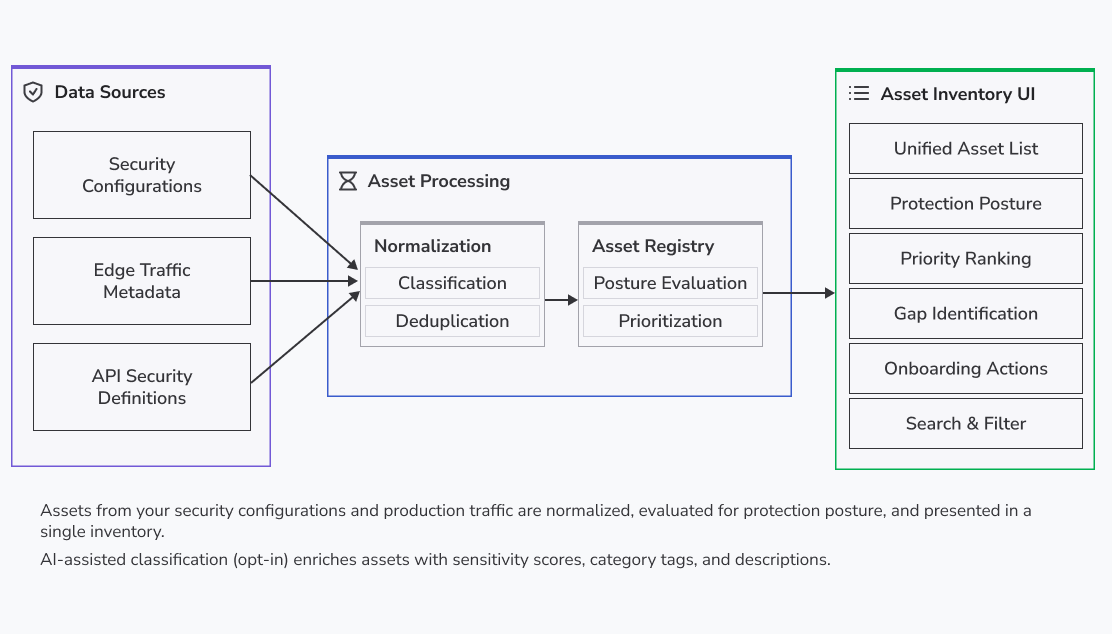
- Discovery. Uses production traffic flowing through Akamai’s edge network to identify hostnames and API endpoints.
- Normalization. Normalizes assets from all sources into a common format and deduplicates so the same asset from different sources appears as a single entry.
- Posture evaluation. Evaluates each managed asset against its security configuration to determine protection coverage and identify gaps.
- Prioritization. Assigns each asset a priority based on business impact and protection gaps, helping you focus on assets that need attention.
Consent and AI usage
Asset Inventory requires you to accept Akamai’s AI usage terms before the service can process your data. You can revoke consent at any time.
How Akamai handles your data
- No personally identifiable information (PII) is sent to AI models. AI processing uses only asset metadata. Akamai does not process request bodies, user data, or payload content.
- All processing runs on Akamai-managed infrastructure. Akamai hosts AI models on internal infrastructure and does not send data to external AI provider APIs.
- Akamai does not train models on your data. Akamai uses AI outputs solely to enrich asset information within the platform. Akamai does not use your data for model training or improvement.
- AI outputs are advisory only. AI does not modify your security configurations or trigger any automated actions.
For more details on Akamai's approach, see Responsible use of AI in App & API Protector and related solutions.
AI-assisted classification
Asset Inventory uses AI to enrich your asset data:
- Sensitivity classification. Estimates the business impact of each asset.
- Category tagging. Assigns descriptive tags to assets based on their function.
- Asset descriptions. Generates human-readable summaries of what each asset does.
- Discovery confidence. Improves the accuracy of traffic-based API endpoint detection.
Getting started
To get started using Asset Inventory, see Manage assets with Asset Inventory. This guide explains how to access and use Asset Inventory to identify protection gaps and prioritize which assets to address first.
Updated 43 minutes ago