
Create a stream
In DataStream 2, you can choose from one of the available log types to monitor your delivery (CDN) properties, Global Traffic Management domains, Edge DNS zones, and get debug logs for EdgeWorkers.
The first step in the creation wizard is choosing a name for your stream that lets you easily find it in on the stream list. Next, choose the properties or zones you want to log data for.
How to
-
Log in to Control Center using a User ID and Password with DataStream access.
-
From the Control Center menu, click Analytics & monitor > DataStream to open the DataStream dashboard.
-
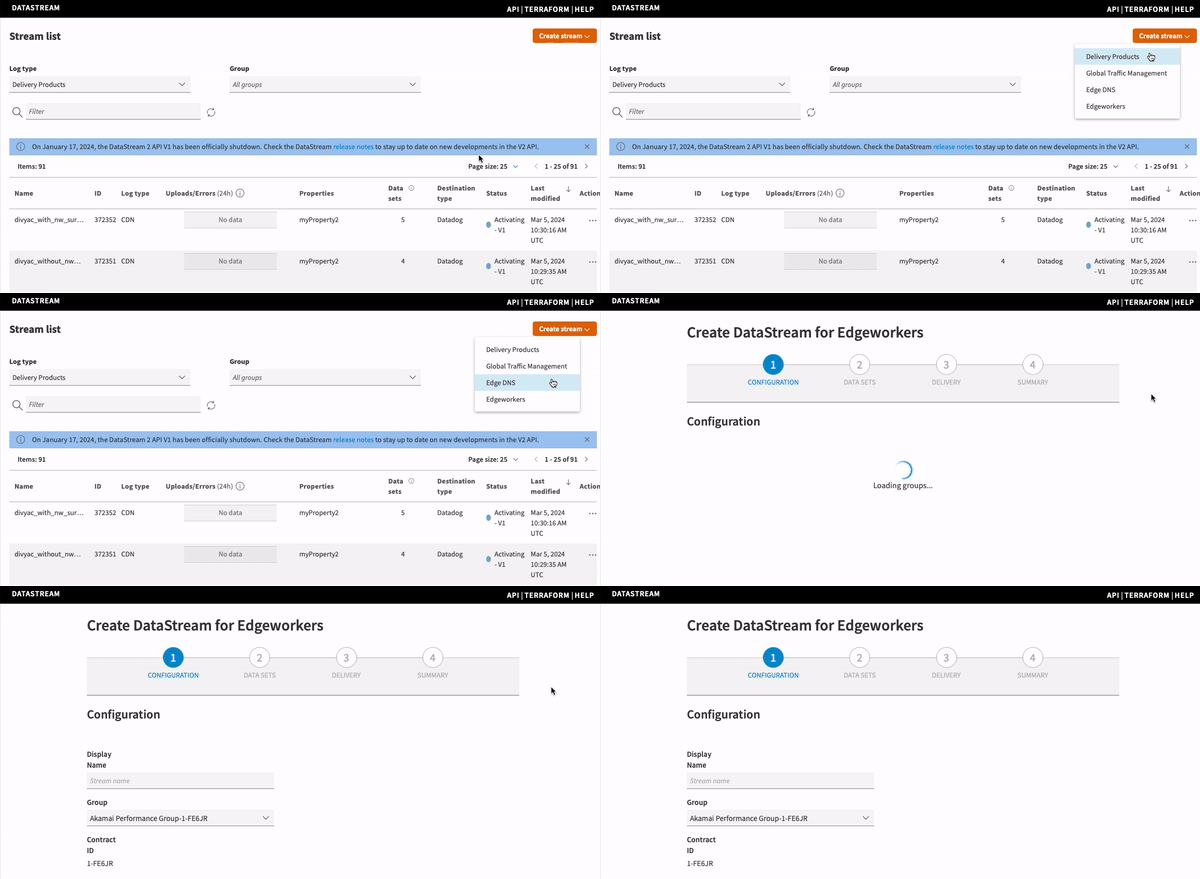
Click Create stream, and choose the log type from the drop-down list.
You can create a stream for delivery properties, Global Traffic Management domain properties, Edge DNS zones, or skip this step for EdgeWorkers streams.
Delivery (CDN) stream
Before choosing the delivery properties for your stream, you may want to review them and make sure they are active on the production network. Open the Properties list in Akamai Control Center to see the list of your properties, and Create a new property or Activate your property if necessary.
-
On the DataStream dashboard page, click Create stream, and choose Delivery products from the drop-down list.
A stream creation wizard opens on the Configuration tab.
-
In Display Name, enter a human-readable name for the stream.
-
In Group, select the relevant account control group.
-
In Contract ID, check if the contract number associated with the group is correct.
-
Choose the Latency profile for your stream. You can create a stream optimized for low latency or high log completeness.
Optimized for faster latency is the default option. See Latency profiles for details.You can associate each property with only one delivery latency profile (low latency or log completeness.
If you want to choose an existing property monitored in another stream with a different profile, Edit an existing stream, uncheck the property you want to monitor in a new stream, save the edited stream, and go back to the creation wizard. Repeat these steps for any applicable streams with the same property.
Your property is now available to choose in the stream you're creating.
-
In Include properties, select up to 1000 properties that you want the stream to collect log data for. All properties must belong to the same product, for example, AMD or DD.
-
Click Next.
You can see only the properties that are active on the production or staging network. If you don't see any properties on the list, it means that no property for this product and group is active on production or staging, and you may need to create and activate a property. See Create a new property in Property Manager.
Akamaized hostnames as destinationsFor HTTP-based destinations, you can create properties with Akamaized hostnames to use as destination URLs for your streams. See custom HTTPS endpoint, Datadog, Elasticsearch, Loggly, Splunk, or Sumo Logic for details.
- Click Next to continue to the Data Sets tab.
Edge DNS streams
You can create an Edge DNS stream to monitor Edge DNS zones that belong to your contract.
How to
-
On the DataStream dashboard page, click Create stream, and choose Edge DNS from the drop-down list.
A stream creation wizard opens on the Configuration tab.
-
In Display Name, enter a human-readable name for the stream.
-
In Group, select the relevant account control group.
-
In Contract ID, check if the contract number associated with the group is correct.
-
In Select zones, choose the Edge DNS zones you want the stream to collect log data for.
-
Click Next.
EdgeWorkers streams
You can create this type of stream to capture and deliver debug logs for your EdgeWorkers configuration. For this log type, you don't need to select properties. EdgeWorkers stream monitors the only configuration on your account.
After creating the stream, create an EdgeWorkers code bundle using the stream ID, and embed it in the EdgeWorker ID. For steps on how to do it, see Use DataStream 2 to deliver JavaScript logs in the EdgeWorkers guide.
How to
-
On the DataStream dashboard page, click Create stream, and choose EdgeWorkers from the drop-down list.
A stream creation wizard opens on the Configuration tab.
-
In Display Name, enter a human-readable name for the stream.
-
In Group, select the relevant account control group.
-
In Contract ID, check if the contract number associated with the group is correct.
-
Click Next.
Global Traffic Management streams
You can create a Global Traffic Management stream to monitor GTM domain properties.
How to
-
On the DataStream dashboard page, click Create stream, and choose Global Traffic Management from the drop-down list.
A stream creation wizard opens on the Configuration tab.
-
In Display Name, enter a human-readable name for the stream.
-
In Group, select the relevant account control group.
-
In Contract ID, check if the contract number associated with the group is correct.
-
In Select properties, choose the GTM domain properties you want the stream to collect log data for.
-
Click Next.
Next steps
Now, you can specify the data set fields that you want to log in your stream. For steps, go to Choose data parameters.
Log delivery
Property Manager-dependent streams onlyThis step is required only for streams with the DataStream behavior configured in Property Manager. See Integration types for details and differences DS-managed and PM-dependent streams.
Your streams will start delivering logs to your destination after you enable and configure the DataStream behavior for your property in Property Manager.
You can add multiple instances of the DataStream behavior to your property configuration, but in each instance of the behavior you can choose only from the same streams you created (a maximum of 3 streams per property).
See Enable the DataStream behavior for details on how to choose the streams and configure the behavior to start streaming log data.

Updated 4 months ago