---
updatedAt: 2026-04-20T20:18:31.000Z
---
# Sign-in Success screen (v1) CSS
[block:callout]
{
"type": "info",
"body": "Looking for the Hosted Login v2 version of this screen? Then see [Sign-In Successv2](https://techdocs.akamai.com/identity-cloud/docs/the-v2-sign-in-success-screen-loginsuccess-css)."
}
[/block]

This screen appears after a user successfully logs in.
# Login page HTML
To help you put the CSS classes in context, the following snippet shows the HTML markup used to define the screen. To view the latest HTML for a screen, right-click a blank spot on your Hosted Login login page, click **View Page Source**, then search for the screen name.
[block:code]
{
"codes": [
{
"code": "
\n
\n \n
{* textLoginSuccessful *}
\n
\n \n
",
"language": "html"
}
]
}
[/block]
# CSS classes used on this screen
The following table lists all the CSS classes used on this screen; the table also includes the default CSS specified for each class. Note that some classes, such as **footer-text**, aren't defined in the base.css file.
| CSS Class | Default CSS |
| :---------------------------------- | :-------------------------------------------------------------------------------------------------------------------------------------------------------------------------------------------------------------------------------------------------------------------------------------------------------------------------------------------- |
| auth-success-screen content-wrapper | auth-success-screen.content-wrapper { max-width: 275px; margin: 0 auto 20px; padding:25px 0 25px 75px } |
| content-wrapper) | #content-wrapper { background-color: #fff; box-shadow:1px 1px 5px 2px rgba(0, 0, 0, .1) } |
| footer-container | .footer-container { padding: 25px; border-top: 1px solid #f2f2f2; text-align:center } |
| footer-text | |
| footer-extra-text | |
| help-link | |
| screen | .screen { min-width:460px } |
| screen-heading | .screen-heading { margin-top:0 } |
| success-check | .success-check::before { border-color: #fff; border-style: solid; border-width: 0px 6px 6px 0px; position: relative; top: 14px; left: 29px; height: 38px; width: 20px; content: ""; display: inline-block; transform:rotate(45deg) } |
# CSS classes mapped to UI elements
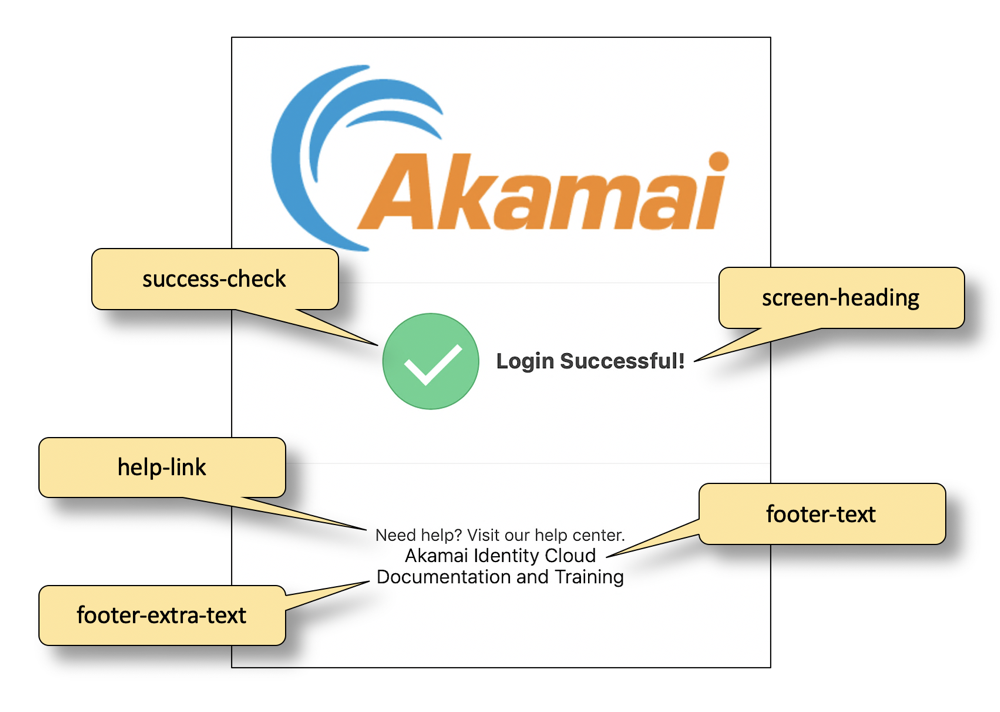
The following graphic maps CSS classes to the more-visible UI elements used in the screen:
# See also
* [Sign-in Success screen (v1) overview](https://techdocs.akamai.com/identity-cloud/docs/the-v1-sign-in-success-screen-loginsuccess-overview)
* [Sign-In Success screen (v1) text reference](https://techdocs.akamai.com/identity-cloud/docs/the-v1-sign-in-success-screen-loginsuccess)
# Sibling pages
* [Account Created screen (v1) CSS](https://techdocs.akamai.com/identity-cloud/docs/the-v1-account-created-screen-registrationsuccess-css.md)
* [Account Marked for Deletion screen (v1) CSS](https://techdocs.akamai.com/identity-cloud/docs/the-v1-account-marked-for-deletion-screen-deleteaccountsuccess-css.md)
* [Additional Information Required screen (v1) CSS](https://techdocs.akamai.com/identity-cloud/docs/the-v1-additional-information-required-screen-authrule_reqattrs-css.md)
* [Complete Social Registration screen (v1) CSS](https://techdocs.akamai.com/identity-cloud/docs/the-v1-complete-social-registration-screen-socialregistration-css.md)
* [Create Account screen (v1) CSS](https://techdocs.akamai.com/identity-cloud/docs/the-v1-create-account-screen-traditionalregistration-css.md)
* [Email Has Been Verified screen (v1) CSS](https://techdocs.akamai.com/identity-cloud/docs/the-v1-email-has-been-verified-screen-verifyemailsuccess-css.md)
* [Email Verification Code Not Valid screen (v1) CSS](https://techdocs.akamai.com/identity-cloud/docs/the-v1-email-verification-code-not-valid-screenverifyemail-css.md)
* [Email Verification Required screen (v1) CSS](https://techdocs.akamai.com/identity-cloud/docs/the-v1-email-verification-required-screen-authrule_verifyemail-css.md)
* [Forgot Password screen (v1) CSS](https://techdocs.akamai.com/identity-cloud/docs/the-v1-forgot-password-screen-resetpasswordrequest-css.md)
* [Logout Success screen (v1) CSS](https://techdocs.akamai.com/identity-cloud/docs/the-v1-logout-success-screen-logoutsuccess-css.md)
* [Manage Account Security screen (v1) CSS](https://techdocs.akamai.com/identity-cloud/docs/the-v1-manage-account-security-screen-manageprofile_security-css.md)
* [Manage Personal Data screen (v1) CSS](https://techdocs.akamai.com/identity-cloud/docs/the-v1-manage-personal-data-screen-manageprofile_data-css.md)
* [Manage Privacy Settings screen (v1) CSS](https://techdocs.akamai.com/identity-cloud/docs/the-v1-manage-privacy-settings-screen-manageprofile_privacy-css.md)
* [Manage User Profile screen (v1) CSS](https://techdocs.akamai.com/identity-cloud/docs/the-v1-manage-user-profile-screen-manageprofile-css.md)
* [Merge Social Account screen (v1) CSS](https://techdocs.akamai.com/identity-cloud/docs/the-v1-merge-social-account-screen-mergeaccounts-css.md)
* [Merge Traditional Account screen (v1) CSS](https://techdocs.akamai.com/identity-cloud/docs/the-v1-merge-traditional-account-screen-traditionalauthenticatemerge-css.md)
* [Password Has Been Changed screen (v1) CSS](https://techdocs.akamai.com/identity-cloud/docs/the-v1-password-has-been-changed-screen-resetpasswordsuccess-css.md)
* [Password Reset Instructions screen (v1) CSS](https://techdocs.akamai.com/identity-cloud/docs/the-v1-password-reset-instructions-screen-resetpasswordrequestsuccess-css.md)
* [Password Reset Link is Invalid screen (v1) CSS](https://techdocs.akamai.com/identity-cloud/docs/the-v1-password-reset-link-is-invalid-screen-resetpasswordcodeexchange-css.md)
* [Personal Data Requested screen (v1) CSS](https://techdocs.akamai.com/identity-cloud/docs/the-v1-personal-data-request-screen-requestdatasuccess-css.md)
* [Profile Updated screen (v1) CSS](https://techdocs.akamai.com/identity-cloud/docs/the-v1-profile-updated-screen-profilesavesuccess-css.md)
* [Reset Password screen (v1) CSS](https://techdocs.akamai.com/identity-cloud/docs/the-v1-reset-password-screen-resetpassword-css.md)
* [Sign-In screen (v1) CSS](https://techdocs.akamai.com/identity-cloud/docs/the-v1-sign-in-screen-signin-css.md)
* [Terms of Service screen (v1) CSS](https://techdocs.akamai.com/identity-cloud/docs/the-v1-terms-of-service-screen-authrule_acceptlegal-css.md)
* [Thank You for Visiting screen (v1) CSS](https://techdocs.akamai.com/identity-cloud/docs/the-v1-thank-you-for-visiting-screen-visitingmessage-css.md)
* [User Consent Required screen (v1) CSS](https://techdocs.akamai.com/identity-cloud/docs/the-v1-user-consent-required-screen-authrule_consents-css.md)
* [Verification Email Sent screen (v1) CSS](https://techdocs.akamai.com/identity-cloud/docs/the-v1-verification-email-sent-screen-resendverificationsuccess-css.md)