---
updatedAt: 2026-03-01T18:45:49.000Z
agentTools:
siteIndex: https://techdocs.akamai.com/llms.txt
projectIndex: https://techdocs.akamai.com/cloudlets/llms.txt
---
# Review available match types for Forward Rewrite
# Available match types
Before you start setting up your Forward Rewrite rules, review the match types available with this Cloudlet:
[block:parameters]
{
"data": {
"h-0": "Match Type",
"h-1": "Matches Based on...",
"h-2": "Wildcard Support",
"h-3": "Case Sensitivity Support",
"h-4": "Multiple Value Support",
"0-0": "[Cookie](https://techdocs.akamai.com/cloudlets/docs/cookie)",
"0-1": "a combination of cookie name and cookie value.",
"0-2": "✓",
"0-3": "✓",
"0-4": "✓",
"1-0": "[Device Characteristics](https://techdocs.akamai.com/cloudlets/docs/device-charac)",
"1-1": "a list of available device characteristics.",
"1-2": "",
"1-3": "",
"1-4": "",
"2-0": "[File Extension](https://techdocs.akamai.com/cloudlets/docs/file-ext)",
"2-1": "the file extensions to match on.",
"2-2": "✓",
"2-3": "✓",
"2-4": "✓",
"3-0": "[Hostname](https://techdocs.akamai.com/cloudlets/docs/hostname)",
"3-1": "the hostnames to match on.",
"3-2": "",
"3-3": "",
"3-4": "✓",
"4-0": "[IP address/CIDR list](https://techdocs.akamai.com/cloudlets/docs/ip-addr-cidr-list)",
"4-1": "an IP address or CIDR list. You can also select whether to use the client IP address from the connecting IP address, the X-Forwarded-For HTTP header value, or either option.",
"4-2": "",
"4-3": "",
"4-4": "✓",
"5-0": "[Protocol](https://techdocs.akamai.com/cloudlets/docs/protocol)",
"5-1": "the protocol to match on. HTTP or HTTPS protocol are the current options, and you can only select one protocol per match.",
"5-2": "",
"5-3": "",
"5-4": "",
"6-0": "[Proxy](https://techdocs.akamai.com/cloudlets/docs/proxy)",
"6-1": "whether the edge platform has determined that the incoming IP address is acting as a proxy.",
"6-2": "",
"6-3": "",
"6-4": "",
"7-0": "[Query String](https://techdocs.akamai.com/cloudlets/docs/query-string)",
"7-1": "the query string values to match on. For example, name or name=value1 or name=value1 value2 .",
"7-2": "✓",
"7-3": "✓",
"7-4": "✓",
"8-0": "[Request Header](https://techdocs.akamai.com/cloudlets/docs/req-header)",
"8-1": "a request header value.",
"8-2": "✓",
"8-3": "✓",
"8-4": "",
"9-0": "[Request Method](https://techdocs.akamai.com/cloudlets/docs/req-method)",
"9-1": "the method used for the request, like GET or POST .",
"9-2": "",
"9-3": "",
"9-4": "",
"10-0": "[URL Path](https://techdocs.akamai.com/cloudlets/docs/url-path)",
"10-1": "the URL paths to match on. For example: /clothing/children/shoes/shoe1.jpg",
"10-2": "✓",
"10-3": "✓",
"10-4": "✓",
"11-0": "[URL Regular Expression](https://techdocs.akamai.com/cloudlets/docs/url-regexp)",
"11-1": "a regular expression. For more information see the [Forward Rewrite regular expression example](https://techdocs.akamai.com/cloudlets/docs/review-available-match-types-forward-rewrite#forward-rewrite-regular-expression-example).",
"11-2": "",
"11-3": "",
"11-4": "",
"12-0": "[User Location Data](https://techdocs.akamai.com/cloudlets/docs/user-loc-data)",
"12-1": "a combination of the following geographic categories: continent, country, and region/state.",
"12-2": "",
"12-3": "",
"12-4": "✓"
},
"cols": 5,
"rows": 13,
"align": [
"left",
"left",
"left",
"left",
"left"
]
}
[/block]
# Forward Rewrite regular expression example
Here's how you can set up a regex rule for forwarding both HTTP and HTTPS traffic from the same inbound URL to a different outbound URL:
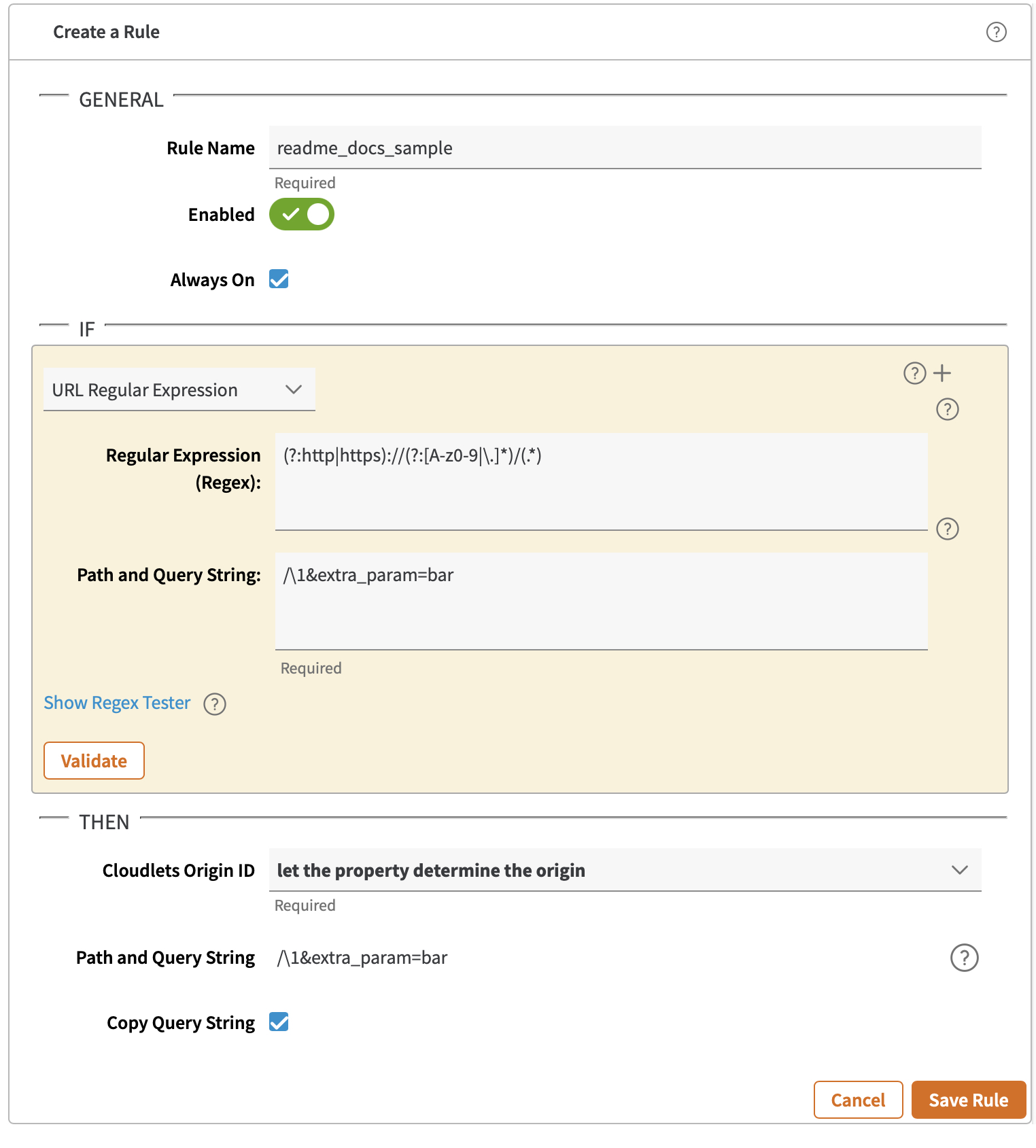
In this case, the Regular Expression value is `(?:http|https)://(?:[A-z0-9|\.]*)/(.*)` and the Path and Query String value, with substitution pattern, is `/\1&extra_param=bar`.
> 📘
>
> For Forward Rewrite, you can only use substitution patterns on the URL path. If you want to change the protocol or host, you need to use [Conditional Origins](https://techdocs.akamai.com/cloudlets/docs/about-conditional-origins).
When this rule is activated, all requests to `http://www.example.com/path1/path2/home.html?query=foo` would retrieve content from `http://www.neworigin.com/path1/path2/home.html?query=foo&extra_param=bar` without changing the URL.
> 📘
>
> If your regular expression includes any characters that have a special use in regular expressions (like ".", "+", or "?"), you must use a backslash ( \ ) to escape each special character.
# Sibling pages
* [About Forward Rewrite](https://techdocs.akamai.com/cloudlets/docs/what-forward-rewrite.md)
* [Review Forward Rewrite setup tasks](https://techdocs.akamai.com/cloudlets/docs/review-forward-rewrite-setup-tasks.md)
* [Create a Forward Rewrite policy](https://techdocs.akamai.com/cloudlets/docs/create-forward-rewrite-policy.md)
* [Add a Forward Rewrite rule](https://techdocs.akamai.com/cloudlets/docs/add-forward-rewrite-rule.md)
* [Configure the Forward Rewrite behavior](https://techdocs.akamai.com/cloudlets/docs/configure-forward-rewrite-beh.md)